NeoPaint v4.7a

NeoPaint is a full featured artist's studio for Windows & vista that's easy-to-learn, powerful and affordable! It's simple enough for beginners yet packed with powerful features and advanced tools. Includes an excellent screen capture feature, animated GIF editor, icon editor, special effects, natural media painting tools, and more. NeoPaint makes it easy for business and home users to touch up photographs and create great looking graphics for desktop publishing, presentations and the Internet!
Some of NeoPaint's many powerful features include: support for many popular image formats like JPEG, GIF, PCX, TIFF, BMP and PNG; integrated support for scanners and digital cameras; professional quality output to any Windows compatible black and white or color printer; multiple undo levels; dozens of special effects and textures; custom paint brushes; photo retouch and color correction tools; high quality color and format conversion; masking; red-eye removal; cloning; stamp pad; 3D objects, color separation; Picture Browser with file management tools; built-in NeoGrab Screen Capture; and dozens of other tools and options. NeoPaint also includes some exciting natural media tools including charcoal, crayon, chalk, ink, watercolor, oil paint and more.
In addition, NeoPaint includes powerful built-in Animation Tools for creating and editing animated GIF files, and a built-in Icon Editor for creating and editing Windows icons and cursors. Unlike some basic stand-alone GIF animation utilities and icon editors, NeoPaint's integrated editor provides you with complete access to a full range of powerful painting and editing tools. Good news for users of NeoSoft's NeoBook software: NeoPaint can also be used to create and edit NeoBook's Cartoon (CAR) files. You can even open an Animated GIF and save it as a Cartoon file or vice versa.
Features:
* Painting and Drawing Tools: Brush, Airbrush, Highlighter/Magic Marker, Charcoal, Crayon, Chalk, Watercolor, Oil, Quill Pen, Custom Brushes, Eraser, Color Eraser, Flood Fill, Tile Fill, Gradient Fill, Color Replacement Fill, Text, Line, Bezier Line, K-Line, Color Sampler, Smudge, Blend, Sharpen, Soften, Sponge, Clone, Red-Eye Removal, Multi-Level Zoom, Patterns, Rectangles, Ellipses, Polygons, 3D shapes and more.
* Multi-Level Undo/Redo: Powerful undo/redo feature keeps track of multiple changes made to your pictures.
* Stamp Pad: Quickly assemble pictures using collections of clip art and stamp images. Create, edit, rename and delete stamps. Stamp images may even be used as custom multi-colored brushes.
* Selection Tools: Rectangle, Ellipse, Polygon, Freehand, Fill and Color selection with Transparent, Solid, and Edge Blending options.
* Special Effects and Textures: Blur, Erode, Sharpen, Soften, Noise, Antialias, Impressionism, Pen & Ink, Pointillism, Mosaic, Border, Buttonize, Vignette, Auto Trim, Fade, Halftone, Posterize, Solarize, Blend, Emboss, Lattice, Motion Blur, Pixelize, Screen, Smoked Glass, Streak, Wirlpool, Wave, Acid Wash, Cameo, Crystallize, Texture Melt, Toxic Rain and Vaporize. Textures: Brick, Burlap, Canvas, Cast Iron, Clouds, Coral, Crumpled Paper, Denim, Dirt, Fire, Grease, Leather, Marble, Matting, Melted Plastic, Oatmeal, Plasma, Sand, Sponge, Stucco, Thick Paint, Tile, Water, Wood and more.
* Color Control: Works with 2, 16, 256, grayscale and 16 million color images. Custom Palettes, Color Balance, Color Similarity, Brightness, Contrast, Hue, Saturation, Color Reduction/Conversion, Color Separation/Combining, Gamma Correction, etc.
* Screen Capture: Integrated NeoGrab utility that makes creating screen shots for manuals, training, newsletters and web sites fast and easy. A variety of capture methods make it simple to get just the portion of the screen you want.
* Picture Browser: Integrated Picture Browser can be used to display thumbnail previews of an entire folder of image files. Additionally, previewed files may be opened, copied, moved or deleted using the included file management tools.
* Scanner Support: Provides direct access to most TWAIN compatible scanners and digital cameras.
* Printing: Excellent printed output to any Windows compatible black and white or color printer! Print preview allows exact placement and sizing. Print crop marks, CMYK separations, and more.
* Internet/Web support: Create and edit Animated and Transparent GIF images. Use the GIF and JPEG optimization functions to reduce file size. The "Load from the Web" option can load images into NeoPaint using an Internet URL address.
Supported File Types:
BMP- Windows Bitmap
CAR - NeoBook Cartoon
CUR - Windows Cursor
GIF - CompuServe (supports both transparent and animated formats)
ICO - Windows Icon
JPG - JPEG/JFIF
NPM - NeoPaint Mask
PAL - Palette File
PCT - Macintosh PICT
PCX - ZSoft/PC Paintbrush
PNG - Portable Network Graphics
PSD - PhotoShop 3
RAS -Sun Raster
ST - NeoPaint Stamp (DOS format)
STW - NeoPaint Stamp (Windows format)
TIFF - Tagged Image Format
TGA - Targa
WPG - WordPerfect (raster format only)
WMF - Windows Meta File (raster format only)
System Requirements:
Windows 95, 98, ME, NT 4x, 2000, XP, Vista or higher
A hard disk with 10 MB free space
Mouse or other Windows-supported pointing device
Windows-supported printer (optional)

CDRoller v7.51.70


CDRoller v7.51.70 - 7,81 MB
CDRoller is a powerful, easy-to-use and low-cost toolset for CD/DVD data recovery. CDRoller supports industry-standard ISO 9660 file system, including Microsoft's extensions for long file names support, so-called Joliet extensions. CDRoller also supports the discs formatted in UDF file system, including versions 1.02, 1.50, 2.0, 2.01 and also so-called UDF Bridge format. Support of wide set of CD, CD-R, CD-RW and DVD formats such as: CD-DA, CD-ROM, CD-WO, CD-ROM XA and Mixed-Mode CD, Stamped multisession CD, CD-MRW ("Mt. Rainier" CD-RW), DVD-ROM, DVD-R, DVD-RW, DVD+R, DVD+RW, DVD-RAM.
Features:
• Effectively retrieves the data off the discs created by "drag and drop" CD/DVD writing software, such as well-known Roxio (Adaptec) and Ahead Nero software packages, CeQuadrat's PacketCD, Instant Write, B's CLiP and others.
• Recovers CD and DVD data created by standalone devices that record directly onto disks, including: Sony digital cameras, DVD camcorders, personal DVD recorders, etc.
• "On-the-fly" unpacks the files initially compressed by Roxio (Adaptec) DirectCD.
• Retrieves back up files from the discs recorded in several stages (multisession discs).
• Includes a built-in UDF Reader. There is no need to install a third-party software, for example Roxio (Adaptec) UDF Reader driver.
• Finds and retrieves the lost files on UDF discs, including: accidently deleted files, files on quick-formatted disc, files on incorrectly closed disc, etc.
• Rescues the data from scratched, damaged or defective discs.
• Provides direct access to the hardware, bypassing the Windows File System. Looks for the lost tracks (sessions) every time when you insert a new disc into the drive
• Digitally extracts audio tracks into a wide set of wave formats.
• Tests CD readability.
• Extracts ISO Image file.
• Catalogs files and folders into CD library.
• All features are integrated into a common and easy-to-use intuitive shell. User Interface is similar to well-known Windows 95 File Manager (Windows Explorer), with file property pages, pop-up (context) menus and drag-and-drop support.
Support of wide set of CD, CD-R, CD-RW and DVD formats such as:
* CD/DVD format CD-DA,
* CD/DVD format CD-ROM,
* CD/DVD format CD-WO,
* CD/DVD format CD-ROM XA and Mixed-Mode CD,
* CD/DVD format Stamped multisession CD,
* CD/DVD format CD-MRW ("Mt. Rainier" CD-RW),
* CD/DVD format DVD-ROM, DVD-R, DVD-RW, DVD+R, DVD+RW, DVD-RAM.
Changes in Version 7.51.70
* Current version of CDRoller.
* Forced scan updated. Added support of DVD-R, DVD+R DL, DVD-RW and DVD+RW discs, created by AVCHD camcorders.
* UDF reader updated. Improved data recovery on the discs with UDF 2.50 file system.
* German, Spanish and Italian versions of CDRoller 7.5 issued.
Homepage
Download: (Size: 7,81 MB)
Replay AV v8.42


Replay AV v8.42 - 40,1 MB
Replay A/V is the simplest and most powerful way to capture Video and Audio from the Web on your PC. Replay A/V does it all. Capture video clips and music. Record live, or schedule recordings to happen later. Automatically convert to 36 different video and audio formats, including iPod Video, iPod Audio and iPod Audiobook. Use the integrated Media Guide to pick radio and TV shows and stations. And best of all, Replay A/V is really easy to use.
Record, Schedule and Convert All Kinds of Streaming Video and Audio
* Capture Online Video Clips
* Schedule and Record Radio Shows and Stations
* Find Radio, TV & Podcasts with the Integrated Media Guide
* Convert to 36 Popular Output formats
* Record Internet TV Stations
* Turn Audiobooks into MP3 Files
* Record XM™ and Sirius™ Online feeds
* Download and Convert Podcasts and Video Blogs
* Record from Webcams or audio devices attached to your PC
* Record, Convert and Copy to iPod automatically
* Easy to use
Features:
The Most Advanced Recording Technology
Replay A/V is the only software that combines Stream Capture, Audio Recording and an Enhanced Podcast Client in one easy-to-use interface.
Stream Capture lets you save the bits and bytes of streaming audio and video directly from the internet. Replay A/V is the only software that supports Windows Media™, Real™, Flash™, QuickTime™ and Shoutcast™ streams. The benefits of this technology are enormous - you can capture multiple streams simultaneously (10 or more is doable with most broadband connections), and you get perfect reproduction at the smallest possible size. Plus, unlike other audio capture programs, no background noises creep into your recordings, and the sound card remains free for normal use. You can record XM Radio and Sirius using this method, too. Replay A/V also converts captured audio to MP3, WAV or iPod Audiobook files.
Audio Recording captures anything you can hear on your PC, and saves it to MP3 or other popular formats. This means that you can capture any format, even ones that haven't been invented yet. And it's great for making personal copies of Audio Books or other content.
Special output options like Eliminate Dead Air and Compressed Speech make Audio Recording even more useful.
The Enhanced Podcast Client built into Replay A/V gives you extra capabilities the big guys can't do. Any Podcast can be converted to a bookmarkable file on your iPod (so you can return to the place you were last listening). BitTorrent Podcasts are supported. You can download individual episodes with one click. There's a lot more, too.
Replay A/V is Really Easy To Use
It's easy to capture video clips or audio archives. Just choose Record, Stream Capture from the menu, play your clip, and record it now or later.
This version of Replay AV includes the new Applian Media Courier powered by YouSendIt which automatically sends your recordings to you via e-mail. Thanks to this new feature you now don't have to wait to hear all your favorite recordings - you can set up Replay AV to send them to you as soon as the recording is over! You great is that!
Setting up scheduled recordings from online radio and tv stations is very simple: Simply open the Media Guide within Replay A/V, pick your show, station or Podcast, and it's automatically scheduled for recording. There's a lot to choose from - the Integrated Replay Media Guide contains thousands of Radio Shows, Radio Stations, Podcasts and Online TV Stations. You can also use the URL Finder to locate stations not listed in the guide.
Watch Short Video Demonstrations of Replay AV 8
play videoIntroduction to Replay AV 8
play videoHow to Record Any Audio You Can Hear on Your PC
play videoHow to Add A Station from the Media Guide to Replay A/V
play videoRecord a Radio Show with Replay AV 8
play videoUse Media Paks to find great content with Replay AV 8
play videoCapture YouTube Videos with Replay AV 8
play videoCapture then Convert Media with Replay AV 8 and Replay Converter
play videoRecord a Radio Show and Send the File Anywhere with Replay AV 8 and YouSendIt
play videoRecord a Video and Send the File Anywhere with Replay AV 8 and YouSendIt
Replay AV Solutions
Here are some cool things you can do with Replay A/V:
* Replay A/V Overview
* Capture YouTube™ videos.
* Capture Windows Media™ or Real Video™ clips.
* Record Internet Radio shows.
* Record and Send Internet Radio shows.
* Record Sirius™ Radio shows.
* Record XM Radio™ shows.
* Record iTunes™ radio stations.
* Record Shoutcast™ radio stations.
* Download Podcasts.
* Schedule and Record from Webcams.
* Convert Audio Books to MP3 files.
* Record from any audio device (radio, record player, cassette, etc.) attached to your PC.
* Record ANY audio you can hear on your PC.
Key Advantage Typing Tutor v1.1

Key Advantage Typing Tutor v1.1
Typing Tutor Software | Key Advantage Typing Tutor - your key to success!
Key Advantage Typing Tutor is a full-featured typing program for learning how to type quickly and accurately. This typing software is designed from the ground up to be fun, intuitive, and easy-to-use. Key Advantage Typing Tutor tracks the progress for multiple typists and generates graphs and reports that are customized for each typist. We believe typing software can teach typing without gimmicky elements and still be entertaining. Our Key Advantage Typing program offers real typing tutor features without any fluff. Our typing tutor software contains innovative concepts like finger-by-finger accuracy reporting. Whether you're a beginner typist, or improving your current typing skills, Key Advantage Typing Tutor is your key to success!
Key Advantage Typing Tutor Software is loaded with features:
* Learn to type fast and accurately in 25 easy-to-follow lessons
* View your typing accuracy and typing speed over time with user-customized graphs and detailed reporting
* Tracks multiple typists so the whole family can participate with a single typing program
* Choose between 2 different "learning to type" styles - one key at a time, or by paragraph
* Master the 10-key number pad in 7 simple typing lessons
* Learn to type using either the Qwerty or Dvorak keyboard layouts
* Receive instant feedback through the key-by-key analysis of your typing performance
* Type fast and accurately to earn award keys and printable certificates as you reach your typing goals
* Learn proper typing posture with detailed diagrams
* View tips for healthy typing to reduce the risk of repetitive injuries
* Practice ergonomic exercises during your typing breaks with animations and detailed instructions
* Never hunt and peck again after learning the value of touch typing
* Simple and useful help files, fast and friendly technical support
* Complete install and uninstall support
Anime Studio Pro v5.6


Smith Micro Anime Studio Pro v5.6
Complete 2D animation for digital artists and professionals!
Perfect for professionals looking for a more efficient alternative to tedious frame-by-frame detailing when creating quality animations. Anime Studio Pro delivers advanced animation tools and effects to speed up your workflow.
Create professional animations. Anime Studio combines cutting-edge features with powerful technology to deliver the most unique animation program for digital artists.
* Bone-Based Animation Technology - Using Anime Studio's bone rigging system, you can add a skeleton to any image by simple point and click, then bring it to life!
* Ready to Use Content - Choose from pre-made Anime style characters or create your own using Anime Studio's drawing and coloring tools.
* Import Your Own Artwork - Draw your own or import 2D imagery, 3D imagery or video files.
* Vector Graphics - Resize your images with no loss in quality using Anime Studio's vector-based layer system.
* Intuitive Timeline - Anime Studio interpolates through your Timeline so you avoid the tedium of frame-by-frame drawing and save time.
* Audio Support - Add audio soundtracks to your animations. Anime Studio supports WAV and AIFF formats.
* Adobe Photoshop Integration - Import layered PSD files using a Photoshop plug-in that converts files to Anime Studio format, included free with Anime Studio Pro.
* Pen Tablet Support - Draw naturally with a pen tablet and recreate the sensation of drawing on paper.
* Publish for Multiple Media - Output your animations to video, TV, and web formats.
Anime Studio Pro adds power and more control over your work. Specifically designed for professionals, Anime Studio Pro provides additional content, tools and capabilities to give you more control and flexibility in creating your animations.
* Additional Professionally-Designed Content - Anime Studio Pro includes 22 3D objects, 24 2D characters, 33 2D props, and 24 sample animation files.
* 3D Capabilities - Turn your canvas into a 3D stage with X, Y and Z coordinates. You can import 3D files (OBJ) from Poser, Shade, Amapi and other 3D applications to use in your animations.
* Advanced Timeline Control - Fine tune your animations with powerful timeline controls, including onion skins, tweening, and graph mode.
* Professional Special Effects - Use built-in special effects tools on your animations, or add your own effects with Anime Studio's powerful scripting capabilities.
* Additional Import/Export Capabilities - Import movie formats including AVI and QuickTime. Easily render stills of your animations and export as common 2D image formats or as layered Photoshop files.
* No Size Restrictions - Anime Studio Pro lets you create animations of unlimited length and file size.
* Audio Support - Add audio soundtracks to your animations. Anime Studio supports WAV and AIFF formats.
Save valuable time and effort. Anime Studio will speed up your workflow so your animation projects get completed faster than ever before.
* Get Started Quickly - Tutorials direct you how to use Anime Studio's powerful features.
* Speed Up Your Production - Draw once and reuse your digital design elements as needed in other scenes.
* Customize Your Workflow - Organize multi-step operations into one-click commands for instant results.
Portable RegistryFix 6.4


Many locations exist that are the cause of the most common PC troubles. We have pinpointed these locations, and our free scanner allows you to scan for invalid registry entries that might be causing your PC issues. The software will inform you of where the errors exist, and what potential errors they might cause. Registryfix will scan for errors related to ActiveX controls, DLL issues, Windows explorer errors, Windows installer issues, Internet Explorer errors, Iexpore and System32 errors, Runtime errors, Outlook and Outlook Express Errors, EXE errors, Svchost errors and a wide variety of other system issues.
Registryfix will scan your system registry and hard drive for invalid file and system references.
These invalid references may cause system instability, PC errors, constant crashes, and general system slowdowns.
The free full scan will identify errors related to :
* Missing file associations
* Missing startup programs
* Invalid device drivers
* Invalid application paths
* Missing DLL files
* Missing help files
* Missing system fonts
* And much more!
Additional product features include
Browser Helper Object Manager
This feature allows you to manager all of your internet explorer objects to ensure only things are running that you want to!
Startup Program Manager
Control all of your start up options from this easy to control utility
Add/Remove Program Manager
Control all of your programs from this easy to control utility.
Full Registry Backup Utility
Control all of your backups from this easy to control utility.
Download 1,34 MB )
Quick Heal Total Security 2008 9.50


Quick Heal Total Security 2008 gives you complete protection from viruses, spywares, and hackers. It also helps you stay connected and communicate over the internet by preventing your system from threats over the Internet. With Quick Heal Total Security in your PC - Enjoy your freedom to work and play in the connected world. With Quick Heal Total Security 2008 in your PC, you can scan and clean mobile phone connected via Bluetooth or USB cable.
Quick Heal AntiVirus and AntiSpyware
Check Mark and VB100% certified engine
100% protection from all the viruses in-The-Wild
Daily automatic updates
Detects and removes complex Spywares and Trojans
Detects and removes latest adwares, dialers, bots and riskwares
DNAScan technology takes care of new unknown malwares even before the signature update is available
Quick Heal Firewall Professional 2.0
Easy configuration of security level
Detects all types of hacker attacks
Protects all types of network connectivity
Monitors all incoming connections automatically
Port stealth
DNAScan Technology provides
Comprehensive future virus protection
Automatic protection from new worms, trojans and bots
Fastest detection rates
CD.Menu.Studio.v2.0.1.28.WinAll.Regged-PALACE

Create autorun CD menus
CD Menu Studio is the easiest way to create autorun menus for your CD, DVD and USB Stick. With CD Menu Studio and a little imagination you can build and share a huge variety of handy projects. Simply click to create a project, edit the content, and burn the project to CD/DVD. CD Menu Studio will do all the rest, and includes flexible options to make it easy for you to share your finished projects.
USB Flash Drive (USB Stick)
The new Windows Vista operating system comes with the autorun feature activated for USB Flash Drives (USB sticks). This means that CD Menu Studio can also be used for this memory-storage type.
Completely Visual - No programming required
CD Menu Studio features a completely visual drag and drop environment. Simply add content such as buttons, photos and text to your pages and position them using your mouse. From opening documents, running programs, viewing websites and sending email, it couldn't be easier! You need absolutely no previous programming knowledge.
Privacy.Shield.v3.0.75.WinAll.Cracked-PALACE


The most thorough Windows cleaning software in the world.
Your computer stores more information than you think! All over your hard drive there is information about the sites you have visited, files opened, people you emailed.
Most people know about clearing IE history and emptying their Recycling Bin. But a simple browse through a few key Windows files will soon uncover your habits. It doesn't even take much to discover these things. You can purchase a program like "Fast File Undelete" for $19 and get back files you thought were long deleted.
What types of things are stored that you don't know about? Windows has a hidden index.dat file that stores the sites you have visited, and it stays around even if you clear your history! There are many other programs that keep histories too, like Windows Media Player, Kazaa, AOL, MSN Messenger, Yahoo! Messenger, Microsoft Office, and many, many more.
Replay Media Catcher 2.20

The Ultimate FLV & MP3 Capture Tool
* Record all kinds of FLV format Flash Videos.
* Capture streaming MP3 files.
* Automatically names songs and video files.
* One click recording.
* MP3 tag editor.
* Works great for hard-to-capture sites using RTMP protocol.
* Free Trial!
* No Spyware. No Viruses. 100% Guaranteed.
Introducing Replay Media Catcher, the only software that lets you capture streaming Flash™ Video (FLV format) and MP3 Audio from previously unrecordable streams. And it’s incredibly easy to use! Just click Start Recording, then laugh heartily as tons of great media fills your hard drive as you play it.
New for Version 2.2 - Capture all YouTube™ Videos FREE in Demo Mode
Replay Media Catcher is smart - it figures out the name of the video or MP3 file you’ve recorded, and names the file automatically. This makes it easier than ever to organize your recorded media. For MP3 files, the artist, album, song title and other information are added to the ID3 tags - this makes your recorded songs appear as they should in iTunes, Windows Media Player, or any other program that plays MP3 files.
Capture FLV Video files from Thousands of Flash™ Video Sites
For capturing online video, you can record from hundreds of popular places, including:
* YouTube™ (captures FREE in demo mode)
* MySpace™
* Sony/BMG Music Videos
* NBC™
* Charlie Rose
* Reuters™
* Metacafe™
* And many, many more!
Snag MP3s from Popular Music Sites
For audio and music sites, Replay Media Catcher will grab the MP3s as they stream down to your PC. It works great with sites like:
* MySpace™
* Pandora
* ProjectPlaylist
* and more!
Google Satellite Maps Downloader 4.27 *PROPER*

Google Satellite Maps Downloader is a cute tool that help
you to get small tile satellite images from google maps.
All downloaded small images are saved on the disk. You can
view downloaded maps by Satellite Viewer Or you can
combine them into a big BMP map. It supports proxy server.
And you can easily get the longitude and latitude of each
downloaded small tile image.
Note: The downloaded images are only for your personal
purpose, non-commercial use.
ESET SysInspector 1.1.0.97 RC
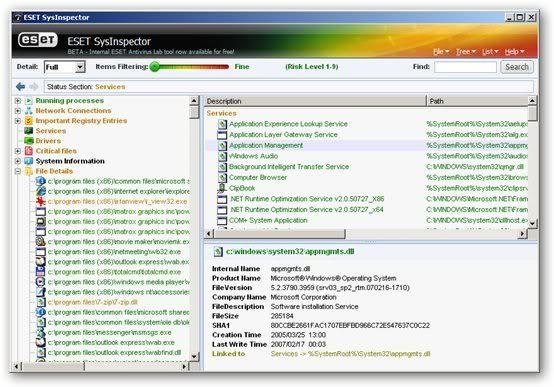
ESET SysInspector is a utility program from ESET, the developer of ESET Smart Security and ESET NOD32 Antivirus, designed to collect information about your computer’s operating environment for the purpose of troubleshooting a variety of issues.
Currently, ESET SysInspector is a “read-only” program in that it is designed to only collect information and not make any changes to the computer on which it is running.
ESET SysInspector is a utility program from ESET, the developer of ESET Smart Security and ESET NOD32 Antivirus, designed to collect information about your computer’s operating environment for the purpose of troubleshooting a variety of issues.
Currently, ESET SysInspector is a “read-only” program in that it is designed to only collect information and not make any changes to the computer on which it is running.
Each time ESET SysInspector is run, it will examine the system to determine its configuration. This may take several minutes to run, depending upon the speed of your computer and its configuration. When ESET SysInspector has completed cataloging the system, it will display this information in its graphical user interface.
Blender 2.46
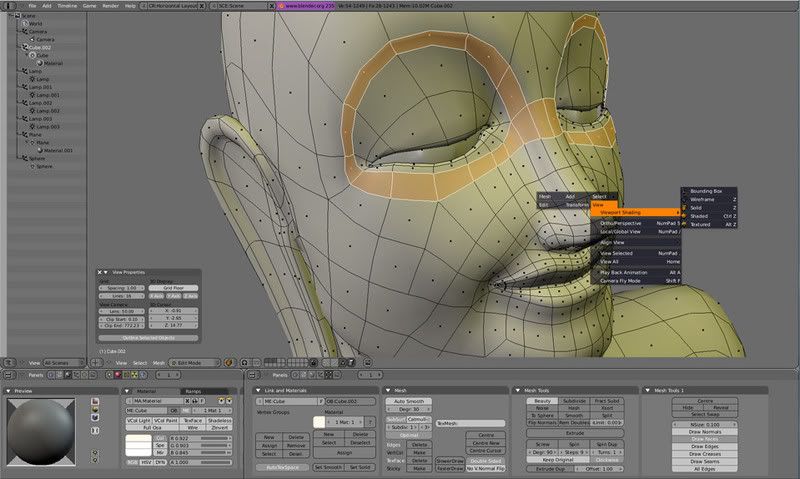
Blender 2.46 new version of free 3D-graphics editor open source. The program has all the tools that are used in professional 3D-editors, so that, working in Blender, you can understand the basics of 3D and understand the principle of work for themselves of such programs.
While this version of the program developers have paid special attention module Game Engine, which improved miscalculation physical tasks as well as new items such as appeared shaders GLSL, the possibility of using multiple materials and maps of UV, the opportunity to work with several windows projection. In addition, improved module Python. It created new scripts and tools for modeling using brushes.
Kantaris Media Player 0.3.7
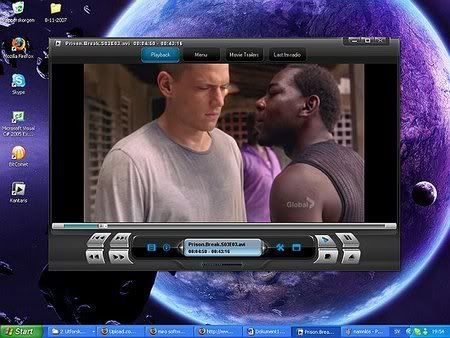
Kantaris Media Player - Player, which can reproduce virtually all multimedia formats - video as well audio.Podderzhivaet formats AVI, MPEG, MGEG-AVC, WMV, MOV, MKV, Quicktime, Matroska, Divx, Xvid, H264, MP3, WMA , OGG and many others. It can also play DVD and audio-CD. The player supports visualization effects when playing music files. Size: 8.2 mb OS: Windows 2000/XP/Vista
ESS AX3000 for Autocad 2002-2008

ESS AX3000 for Autocad 2002-2008
OS: Windows XP Professional / Home // Windows 2000 SP4 | 160 Mb
AX3000 is an easy-to-learn AutoCAD AddOn, that increases
your productivity and creates high-quality plans. As
aresult of over 20 years of experience in the area of
technical building equipment (HVAC), AX3000 was and still
is in close user-contact, is being continuously further
developed and optimized.
Therefore, AX3000 offers a complete HVAC-solution that
completely supports the the construction of your technical
system units.
The building, as basis for your planning, can be either
drawn direct by AutoCAD or imported as finished
architectural plans through the standard AutoCAD
Interface. Your technical systems can be then planned and
drawn. Specific to the program are construction helps, for
example: Item Library, Intelligent Symbols, Automatic
System Recognition and many more.
At the end of the System Regonition, you will receive an
overview of the material dimensions etc, that result froma
quick and detailed plan anaylsis, combined with different
types of lists. The calculation is automatically shown
with an EXCEL-list.
HomePage:
Download:
links for Autocad 2007/2008:
Aurora Media Workshop v3.4.5

Aurora Media Workshop is a all-in-one video, audio, CD/DVD media utility. It is made up of three major fields of functions, that is video, audio, and CD/DVD.
Paragon Partition Manager 9.0 Professional Vista Compatible

Every PC owner sooner or later meets a task of hard disk management. An optimum allocation of disk resources is the key point to manage data and operating systems on your computer effectively. Paragon's award winning Partition Manager provides easy and reliable hard drive partitioning and full-range hard disk management. It enables to create, copy, resize and move hard drive partitions. This full function tool is suitable for home and professional use. Partition Manager helps you to: Enhance computer performance, convert operating systems, defragment partitions, optimize your hard disk partitions cluster size. Resize, move, hide, merge, restore and convert partitions without data loss.
jv16 PowerTools 2008 v1.8.0.460

jv16 PowerTools 2008 is a complete Windows optimization and registry cleaning toolkit. The program allows users to remove hidden traces of previously uninstalled software, to clean the Windows registry for optimal performance and stability, and to fix many registry-based problems with a single mouse click. The highly improved multilingual user interface allows the software to be used in all major languages, while automatic backup and safety features make the program very safe to use
Photoshop Filters collection

Photoshop Filters collection | 90 Mb
Flash Intro & Banner Maker 1.8.80
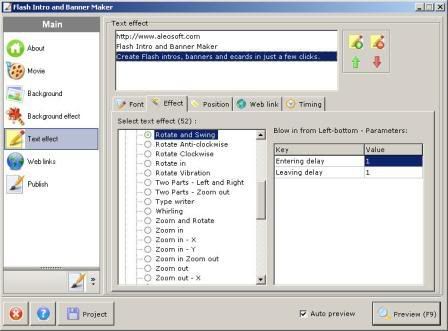
Flash Intro and Banner Maker is a Flash authoring tool to help you create Flash intros, AD banners and ecards with ease. There is no need for knowledge of Flash development studio and Actionscripts, all you need is to input texts and select from premade customizable background effects and text animation effects.
Here are some key features of “Flash Intro and Banner Maker”:
• Wizard style user interface, extremely easy to use;
• Customize width, height, frame rate of Flash movie;
• Add border to Flash movie;
• Add MP3 or WAV file to Flash movie as background sound effect;
• Add preloader to Flash movie;
• Add multiple images or Flash movies to background;
• Lots of background effects to select from, all of them are customizable;
• Add multiple background effects to Flash movie;
• Set background of Flash movie as transparent, solid color, linear gradient color, radial gradient color;
Download:
All Corel Products Keygens 2009
CorelDRAW Graphics Suite X4 14.0
CorelDRAW® Graphics Suite X4 lets you tackle creative graphics and design projects with confidence. Precision tools, market-leading file compatibility and high-quality content help you turn your creative ideas into professional results: from distinctive logos and signs, to striking marketing materials and eye-catching web graphics.
Plus, CorelDRAW Graphics Suite X4 comes packed with additional applications and services to help meet your graphics needs. The suite truly offers the ultimate combination of superior design capabilities, speed, and ease of use for an affordable price.
What's included:
Supporting applications/services in the box
Along with CorelDRAW X4, Corel PHOTO-PAINT X4 and Corel PowerTRACE X4, CorelDRAW Graphics Suite X4 includes many other valuable applications and integrated services:
Corel CAPTURE™: Capture images and other content from your computer screen in professional, high quality with this one-click capture utility.
CorelDRAW® ConceptShare™: This valuable online collaboration tool is integrated into CorelDRAW Graphics Suite X4 making it easy for you to share your designs and ideas with colleagues or clients in real time over the Web. Create multiple workspaces, upload your designs, and invite others to provide feedback or submit their own ideas.
Bitstream Font Navigator: This award-winning font manager for the Windows® operating system lets you manage, find, install, and preview fonts.
WhatTheFont™: This online font identification service from MyFonts.com is integrated into CorelDRAW Graphics Suite X4. Just upload bitmap files to the service, or capture them from web sites with Corel CAPTURE, and WhatTheFont will help identify the font used within the file.
Barcode Wizard: Generate bar codes in a wide range of industry-standard formats.
Service Bureau Profiler: The Profiler helps you prepare your work for professional printing.
Duplexing Wizard: This wizard helps you optimize your work for printing two-sided documents.
Content (clipart/photos/fonts/templates)
CorelDRAW Graphics Suite X4 delivers incredible value with all this additional content*:
* 10,000 high-quality clipart images, individually selected to meet the needs of design professionals and occasional users alike
* 1,000 high resolution, royalty-free photographs from iStockphoto®
* 1,000 OpenType fonts, including 75 Windows® Glyph List 4 (WGL4) and 10 single-line engraver fonts
* 80 professionally designed templates
Corel WordPerfect Office X4 14
Corel® WordPerfect® Office X4 – Standard Edition is the essential office suite for home and business users to create great-looking documents, spreadsheets, presentations, and manage e-mail. Open, edit and save Microsoft® Office documents. Save hundreds with the built-in PDF tools. Take notes and collect and reuse information, ideas and images from virtually anywhere with a new digital notebook. Also includes data analysis software to get insight from your data and online services to help you stay connected.
• Work with Microsoft® Office users. Easily open, edit and create Microsoft® Word, Microsoft® Excel® and Microsoft® PowerPoint® files.*
• File Compatibility. Open new and old files with broad support for over 60 file formats, including current open standards such as OOXML and ODF. In fact, open older Microsoft files that even Microsoft Office 2007 can't open.
• Choose Your Work Environment. Are you new to WordPerfect Office? Use the Workspace Manager to automatically adopt the familiar keystrokes and menus of Microsoft Office.
• Open Document Format (ODF). Open and edit ODF word-processing files, the ISO-standard for storing and archiving documents.
• Windows Vista® and Windows® XP Support. Work with the latest Microsoft operating systems.
FEATURES:
• More Built-in PDF Capabilities. Adobe® Acrobat® not required. Turn your documents, spreadsheets and presentations into PDFs to share with anyone — without having to download or buy additional software.
• PDF Import. Access and reuse PDF content directly in WordPerfect X4 Standard or Pro edition. Simply import the PDF, work with the text and graphics, then save the file to a wide variety of formats*.
• New! Import Image-Based PDFs. With WordPerfect Office X4 Standard and Pro editions, you can easily reuse text by converting PDF files - even scanned, image-based PDFs - into editable text.
• New! Password Protection. Control who can view, copy, edit or print your work by adding a password to a PDF you create in WordPerfect Office X4 Standard, Pro or Home & Student edition.
• New! Tagged PDF Support. Ensure that the PDFs you create in WordPerfect Office X4 Standard, Pro or Home & Student edition can be read by devices for the visually impaired, meeting government accessibility standards.
• New! Support for PDF/A. Easily archive files to meet ISO standards. PDF/A, the de facto archiving format, is a subset of PDF that excludes features that are not suited to long-term archiving, such as external document linking.
• PDF File Size Options. The PDFs you create in WordPerfect Office X4 Standard, Pro or Home & Student edition can be output to a variety of media, including the Web, email or print. Tailor file size and printing resolution options to best suit the platform on which your work will be viewed.
Corel WinDVD Plus 9.0
WinDVD® 9 Plus is DVD & video playback software that delivers quality and entertainment in style. Enjoy state-of-the-art HD-quality upscaling. Watch your movies on the go with advanced laptop enhancements. Play home movies from AVCHD™ camcorders. For those who want the best, WinDVD 9 offers the ultimate DVD and video playback experience.
Make your DVDs look like HD video!
* Unique All2HD upscaling - convert standard DVDs to crisp high-definition video with outstanding color and clarity.
* Digital Natural Motion – choose from several presets for the smoothest possible playback.
Laptop-friendly
* Extend playback time with Battery Optimization.
* Be sure to catch the ending with unique TimeStretch playback.
Complete Format support
* Popular formats – supports DVD-Video, DivX®, RealPlayer®, QuickTime®, Windows Media®, H.264 and AVI.
Stylish Good Looks
* WinDVD 9’s sophisticated new interface blends in seamlessly on your Windows® XP or Vista® desktop.
* Enjoy Easy-to-navigate and clutter-free controls.
FEATURES:
NEW! Unique All2HD Upscaling Technology
• All2HD upscaling converts standard DVD to crisp high-definition video with motion enhancement for outstanding color and clarity.
• Fine-tune the frame rate and increase size - Increases frame size up to FullHD 1080p/60i while maintaining crisp edges.
• NEW! Digital Natural Motion - Uses the latest motion compensation technology. Detecting the original framerate (24, 25 or 30 fps) and intelligently fills in frames on the fly to keep fast moving objects sharp and crisp.
• NEW! De-snow and De-block filters - Removes digital noise from low-resolution video and blocky digital artifacts from compressed video.
• NEW! AVCHD Camcorder Compatibility - Enjoy direct playback of high-definition home movies recorded with the latest AVCHD camcorders from Canon, Sony & Panasonic, either copied from the camcorder hard drive, or on AVCHD disc, or memory card.
• Top Video Technologies - Intel® Clear Video™ and NVIDIA PureVideo® graphics processing.
• Laptop-friendly - Extend playback time with Battery Optimization, and be sure to catch the ending with unique TimeStretch playback.
The Best Audio Technologies
• Dolby Headphone™ - Combines 5.1 surround signals to create a vivid surround sound environment on standard headphones.
• Dolby Pro Logic IIx™ - Transforms 2-channel (stereo) audio from movies and music into 5.1 channel surround sound, or expands 5.1 sources up to 9-channel (7.1) speaker systems. Choose Movie or Music modes to optimize your listening experience.
• DTS® Surround Audio - Superior digital theatre surround sound for the PC to bring clarity and depth to any soundtrack. Supports up to 6-channel digital sound for titles with DTS technology.
• 96 Khz/24-bit audio decoding – Play back high quality audio. SRS audio technologies- Selectively enhance movie dialog or music, or create a virtual surround effect on two speakers.
Broad Format Support
• Standard Definition Video. Play your video clips in any of the standard-definition formats, including DVD-Video, DivX®, Real Player®, QuickTime®, Windows Media®, and AVI.
• HDTV Support. WinDVD can navigate and decode MPEG2 Transport Stream video so users can watch captured HDTV programs. WinDVD 9 also provides navigation tools so users can easily select content to view.
• H.264 Support – Smoothly plays back the next-generation format for premium content and downloaded video, in standard as well as high-definition.
New Corel® Paint Shop Pro® Photo X2 is the ideal choice for any aspiring photographer's digital darkroom. It's filled with everything from easy automatic photo fixes to precision editing tools. It even includes a built-in Learning Center to help new users get started right away!
What's new in Paint Shop Pro Photo X2:
NEW! Express Lab
This all-new, super-fast photo fixing mode is amazing! You'll save hours of time with the Express Lab, because now you can edit dozens of photos in the time it used to take to edit just a few! Just think how easy it will be to breeze through folders full of photos — cropping, rotating, removing red eye, and straightening, — without having to wait for each individual photo to open.
That's only a small taste of the photo fixing you can do in the NEW Express Lab. We can tell you how it helps you fly through viewing and fixing your photos, but to truly understand the power of the NEW Express Lab you have to experience it for yourself.
NEW! Graphite Workspace Theme
Not only is Paint Shop Pro Photo X2 packed with all-new features, it looks different too. As soon as you launch the program, you'll see the NEW Graphite Workspace Theme. This darker theme really makes your photos stand out! And for people who don't like change, you can switch back to the classic interface with just a few clicks.
NEW! HDR Photo Merge
With NEW HDR Photo Merge you can easily create photos that give you full detail in the shadows and the highlights of your photos. HDR Photo Merge helps you combine two or more photos taken at different exposures, and then automatically dodge and burn to bring out the contrast!
NEW! Layer Styles
With the NEW Layer Styles you can easily add drop shadows, embossing, outer and inner glows, bevels and even reflections to your text, photos and creative projects. The best part of these new Layer Styles is if you make any changes to the layer the effect is automatically changed to match.
NEW! Visible Watermarks
Whether you're a professional photographer or someone who wants to share your photos online, it's a good idea to add a discrete watermark that reminds those viewing your pictures who the photographer was. With the NEW Visible Watermarks feature you can easily create and add a personal watermark to all your photos.
NEW! Picture Tubes™ & Picture Frames
Paint Shop Pro Photo X2 includes over 30 brand-new, professionally-designed Picture Tubes™ and 30 new Picture Frames! Plus for people who upgrade to Paint Shop Pro Photo X2, there's an exclusive set of all-new, never seen before Picture Tubes and Picture Frames just for you!
IMPROVED! Black & White Film Conversion
This feature lets you create dynamic black & white photos by simulating the effects of shooting black & white film with colored filters.
Now you can select from a virtually infinite range of color combinations where before you could chose from pre-chosen color filters. This gives you the full creative control of the Channel Mixer command, but in a far simpler interface. Plus you can adjust brightness and apply Clarify to further enhance the black & white effect.
NEW & IMPROVED! Makeover Tools
Paint Shop Pro Photo's Makeover Tools give you a set of professional retouching tools that are easy to use. This year we've added two new features to your toolbox: NEW Thinify™, which makes the people in your photos look thinner with just a click, and New Eye Drops that takes the red out of bloodshot eyes. In addition, improvements have also been made to the Blemish Remover and the Suntan Brush.
NEW! Crop to New Image
For people who scan a lot of images, especially multiple images at once, New Crop As New Image will save you time! Now you can click Crop As New Image, and the cropped portion of your scan is automatically opened in a new document. All you need to do is save it!
Corel DVD Copy 6 Plus
Corel® DVD Copy 6 Plus makes copying DVDs and converting video easy. Enjoy full disc copying features, and convert video in three simple steps for sharing by email, on the Web, iPod®, iPhone™, PSP®, Zune™, mobile phones or portable media players. Easy, fast and reliable, DVD Copy 6 lets you take your video where you want to go. DVD Copy 6 Plus now supports DivX Ultra, Xvid, H.264 HD and MPEG2 HD as well as AVCHD and HDV, including direct import from the latest AVCHD camcorders.
Corel proves that it's not happy to let new tech pass it by without a robust update to DVD Copy. The app has two primary functions: It can copy video files from one source to another, and it can convert files. It can also convert and then copy. DVD Copy 6 supports converting to and from DVD, locally stored files, AVCHD, iPod, PSP, iPhone, cell phone, Nintendo DS and Gameboy, Zune, VCDs, and DivX formats. In our testing, which included an iPod, a DVD, a YouTube video, and several AVI and MPEG videos, we encountered no problems copying and converting from source to destination. The DVD copy function worked a bit slower, but our burner was ripping at 16x, so burner speed has a lot to do with it.
The interface is slick, with Task Buttons in the upper left, a preview pane below them, and Output, Source and Destination options in the center. There also a familiar layout for content being copied or converted and a Progress bar below that. The Help menu was excellent for newbies, though advanced users might find the documentation a bit lacking. Easy enough for beginners to get their feet wet, yet filled with features that should appeal to those familiar with file conversion, Corel DVD Copy 6 is an excellent program for meeting video converting and copying needs.
CopyLater is also included - that lets users schedule uninterrupted batch conversion of videos when they are away from the PC or overnight and an "Intelligent Folder Monitoring" tool. Also included as a "bonus" application is WinDVD 8 Silver, the Virtual Drive Tool and Disc Label with LightScribe support.
Features:
Everything you need – in 3 easy steps:
- DVD Copy offers a simple process to complete most tasks: Just choose Source, Target drive and Format, click Start, and you're on your way to a perfect copy!
- NEW! More user-friendly – The animated Selector Wheel makes choosing tasks easy and fast. Realistic icons clearly show output options for the task at hand.
- NEW! Switch languages – At any time, switch the entire user interface language – great for bilingual environments.
- Enhanced! CopyLater – Save time by letting your PC go to work when you’re away. CopyLater is now available across all Convert File processes, for even greater convenience.
- Intelligent Folder Monitoring – CopyLater can check the folders where you store your video downloads and recorded TV-programs, and automatically convert any new files.
- Internet Copy – Copy videos directly from the Internet. Just enter the Web URL, and Internet Copy will download, convert, and burn it with no further intervention required.
- Personalized discs – When copying a DVD, select just the titles or chapters you want, to create your personal DVD.
- Quick Disc Copy – Need to make a quick 1:1 duplicate disc? Just select Disc Copy, video source & target, and click Burn.
- Copy to Hard Drive – Access and edit your content with ease. DVD Copy lets you duplicate your DVD-Videos onto your hard drive in MPEG-1, MPEG-2 or DivX® format.
- Create Disc Image – Create disc images of your movies and save on your hard drive for later burning. This is the most reliable way to produce multiple copies.
More formats and devices supported:
- NEW! DivX® HD Support – Import and create High-definition DivX HD video files of up to 1280x720 frame size.
- NEW! AVCHD support – DVD Copy will recognize AVCHD video folders imported from your camcorder, and convert them to the format of your choice. Even import directly from you DVD-based AVCHD camera.
- NEW! XVid support – DVD Copy now supports this popular P2P file format, giving you access to much more material.
- NEW! Support for more portable devices – Convert your video to go! MPEG 4 and H.264 templates are available for the Apple iPhone™, as well as a variety of mobile phones and PDAs, and ZuneTM. Send video directly to iPod® and PSP® without intermediate steps.
- H.264 Support – DVD Copy's H.264 codec lets you get more video on your mobile device, without sacrificing quality.
- NEW! H.264 HD Support – Encode your HD video in cutting-edge H.264 HD and save disc space while maintaining great quality.
- NEW! MPEG-2 HD Support – Convert video to HDTV format for playing on your home theater.
- NEW! TiVo® Support – Let DVD Copy take care of converting your TiVo Series 2-recorded files to DVD disc or mobile device.
- Squeeze double layer DVDs – Compress dual-layer DVD-Videos onto single-layer DVDs while maintaining visual quality. Select from six different compression rates and preview the quality before burning.
- Auto-fit DVD-Videos to CD – Copy DVD-Videos to CD in high-quality MPEG-4, DivX & WMV formats! The Auto-fit feature adjusts the bit rate so you can even burn your entire movie onto a single DivX® CD.
- Rip Audio CD & DVD Soundtracks – Extract audio tracks and burn them to CD with the Copy DVD to Audio CD feature.
- LightScribe™ Laser Labels – Burn label designs and text directly on the top surface of LightScribe DVDs and CDs. With supported burners, burn your data first, flip the disc, and then burn your label.
- NEW! Vista-Certified – Fully certified to work with your new Windows Vista™ operating system.
Faster performance:
- NEW! Faster opening time – DVD Copy launches twice as fast as previous versions. Less waiting means more time for copying!
- NEW! Intel® Core™2 Duo Certification – DVD Copy 6 is optimized for faster copying and conversion on the new Intel processors.
Input File Format Support:
- Video: AVI, MPG, M2V,MPEG-1, MPEG-2, MPEG-4, H.264, QuickTime®, MOV, ASF, WMV, DVR-MS, 3GPP/3GPP2, DivX®, Xvid, TiVo®
- Disc: DVD (DVD-Video, DVD+VR, DVD-VR), Video CD (VCD), Super Video CD (SVCD), AVCHD
Output File Format Support:
- Video: MPEG-1, MPEG-2, MPEG-4, H.264, WMV, DivX, DivX mobile qmobile
- Audio: WMA, WAV
- Disc: DVD (DVD-Video, DVD+VR, DVD-VR), Video CD (VCD), Super Video CD (SVCD)
- Mobile Device: iPod®, iPhone™, PSP®, Zune™, cell phone
AnFX 6.0.1.8

This application creates interactive Flash/JAVA animations that load faster the GIF and JPG files.
AnFX is a full featured, yet easy to learn interactive animation tool: It is powerful enough for the most demanding web master yet simple enough for a home user to create impressive interactive content for their home page.
AnFX is an exciting, revolutionary, easy to learn tool that lets anyone harness the power of Flash™ or Java™ to produce eye catching web animations containing not just text but shapes, images and audio also.
AnFX is a software that allows you to create flash animations.
AnFX is made up of two components:
• The AnFX Visual Design Studio where you build your designs and export them to either .swf or .afx format.
• The tiny AnFX player which plays your .afx designs on the web (only required if you choose to export to .afx)
AnFX allows you to create actors that can be manipulated by various actions and triggered by events such as a mouse click, mouse enter, mouse exit etc.
Using combinations of actors and actions it is possible to create a limitless variety of effects played on your site using the compact AnFX player applet. You can even simulate many of the effects provided by single purpose tools that produce menus, scrolling text, marques, fading images etc. , avoiding the need to have to learn and deploy multiple technologies on your site: with AnFX you can do it all - with just ONE highly productive and easy to use tool.
Audio Recorder Plus 4.0.0.20 - Portable

High-quality audio recording software that will enable you to capture sounds form numerous sources.Audio Recorder Plus is an award winning high-quality sound recording software for windows. It enables you to capture any sounds of your PC into MP3, WMA or WAV files quickly and easily!
Using this aplication you will be able to record sounds from Internet broadcasts, MIDI, streaming media (e.g. QuickTime Player, RealPlayer , DVD players, games etc) and your microphone.
Typical applications:
• Record streaming audio into MP3, WAV or WMA files
• Re-record MIDI and protected M4P/WMA files into unprotected MP3 format
• Transfer cassettes and vinyl to your PC
• Record voice in VOX mode
• Record VoIP conversations
• Phone line recording
Main Features:
• Automatic Gain Control
• Voice Activation Sustem
• Naming rules
• Global Hot keys
Recording modes:
• Sampling rate: 8000...48000Hz
• Bitrates: 16...320Kbps
• Channels: Mono/Stereo
OS:
2000/XP/2003/Vista
Kubota Image Tools v4


Yes, we want to make you intelligently lazy. Why spend hours trying to achieve
the beautiful looks you love—
do them in seconds! We have compiled collections
of our favorite Actions—tools that we use every day in our busy studio—for you
to easily apply to your own work.
To use Kubota Photoshop® Actions, you need to have Photoshop CS or higher.
A few of our Actions need CS2 or newer to work, as they use some of the unique
features in the newer versions. Photoshop CS3 or newer is highly recommended
as the new features are well worth it!
Actions are recorded sequences of events within Photoshop. Some Actions are
easy to record, some require complex steps, troubleshooting, and planning.
All should save you countless hours of time over the long haul—
giving you more
time for the really fun stuff.
This Quick Start Guide will cover installation, some basic information on using
Actions, things to look out for, and tips for using our Actions on your images.
If you want some extra hand holding, please watch the video tutorial called
‘_Quick_Start_Kubota_Actions.mov’ in your installation folder. It will walk you
through the following steps.
1
Open your Photoshop application.
Open your Actions Palette. (Figure 1)
Window > Actions
run installer
2 load Actions
AutoPlay Media Studio 7.1


What is AutoPlay Media Studio 7.0?
Create your own custom autorun menus, interactive presentations, multimedia applications, and custom software in just minutes. Use your favorite content such as images, music, video, flash, text, and more, and simply drag n' drop your way to amazing projects
To help you get started quickly we provide extra resources including video training, professional content add-ons, an online user forum, and much more!
Create Your Own Custom Software Applications!
Even if you have no programming experience you can create your own custom software - with comparable features and performance to software products built by professional programmers using C++/Java. AutoPlay Media Studio is a full blown rapid application development platform with a wide selection of options and support for most popular technologies. Owning AutoPlay Media Studio is like having your own professional software programmer on call 24/7.
Even Non-Programmers Can Create Applications Quickly
AutoPlay Media Studio is built from the ground up to be easy to use. Even if you have absolutely no programming experience you'll be able to get started creating your own custom applications in just minutes. No need to memorize a bunch of code, with AutoPlay Media Studio you let the application do the work for you. The built in wizards simplify common tasks like scripting and publishing so that anyone can point and click their way to fantastic projects quickly and easily.
What's New in 7.0?
Version 7.0 of AutoPlay Media Studio is a revolutionary upgrade with dozens of powerful new features being added. At the core is the same amazing Lua-based scripting engine found in all Indigo Rose development tools. With an enhanced selection of integrated objects and actions it's never been easier to create advanced interactive applications using AutoPlay Media Studio. And it's easy to extend your projects with the powerful action plugin architecture, with plugins currently available for such technologies as XML, SQLite, encryption, and more. These are just a few of the exciting additions which make it the most powerful tool in its class.
Download the Free Trial and Get Started Now!
The best way to experience the value of AutoPlay Media Studio is to try it. You can download the free trial version of AutoPlay Media Studio by clicking here. The free trial version will continue to work for a period of 30 days, so you have plenty of time to build projects and see for yourself what a great tool it is. There is no other software in its class which is easier to use, or faster to work with! If you have any questions, we're here to help with free technical support and cost-effective consulting and integration services.
Autopano Pro v1.42

Welcome to the world of Autopano Pro, a world where photography assumes its rightful place, where more time is spent in the field than sitting in front of a computer screen. A world where you are free to take to take the very shots you want without limits or constraints, a world where, at last, your panoramas look like what you want them to!
Welcome to the Autopano Pro revolution.
Watch how to create easily your first panorama with Autopano Pro
Discover the advanced features and the amazing performance of Autopano Pro
Get rid of clichés about the difficulties of panoramic photography, and discover Autopano Pro's new ideas
The panorama creation software Autopano Pro is the most spectacular breakthrough in automated picture stitching in recent years.
• First software to automatically detect pictures belonging to a panoramic photo.
• First software to really correct color and exposure variations between source images.
• First software to perform HDR stitching from bracketed images.
But that's not all! Autopano Pro is incredibly fast. It will take your workflow and productivity to new heights.
Autopano Pro is extremely efficient, even in the most difficult cases. And, at any time, you can take control of all software automations to achieve perfect results. Put it to the test!
Update Patrol v3.1.3

Automatically watch web sites for updates and changes
This web page monitoring software makes following hundreds of web sites and blogs as simple and fast as checking your e-mail.
Automatically watch web sites for updates and changes
This web page monitoring software makes following hundreds of web sites and blogs as simple and fast as checking your e-mail. It will visit web sites for you, as often as you like, and notify you when it finds a change. Stop wasting time in your browser - never visit an unchanged site again!
Monitors web sites, blogs and text files for changes
Improves your productivity by working silently and unattended
Notifies you of changes by popup, sound and/or email
Shows pages with changes highlighted in the internal browser
Checks single pages or entire web sites for changes (NEW)
Dynamic content like page counters and dates can be ignored
Easily imports your existing bookmarks
No limit in number of web pages monitored
No monthly fees - buy once and you own it
Never miss important news again - be the first to know
I do and will be recommending it to stay up to date on software updates, patches, software build notifications. I like anything that increases productivity and UpdatePatrol does just that... - Brian Reisman (Microsoft Corp.)
How much time did you waste online today?
Keeping an eye on a list of web pages can be time-consuming and frustrating. Chances are you visit your bookmarked websites much more frequently than they update their content.
If this sounds familiar, you should let UpdatePatrol do the work for you. This web page monitoring software keeps an eye on websites selected by you, notifying you only when there is something new to see. When you visit the site, the new or altered content will be highlighted.
April 23, 2008
Version 3.1.3 corrects a problem with exclude filters when using the new Follow Links option
UpdatePatrol requires a PC running Microsoft Windows 95, 98, Me, NT 4, 2000, 2003, XP or Vista.
TweakNow Power Pack 2.02

TweakNow PowerPack Professional
TweakNow PowerPack is a fully-integrated suite of utilities that let you fine-tune every aspect of your computer's operating system and Web browser. The RAM Idle program manages the free memory that is available to run Windows programs
It prevents performance from degrading as you swap files and programs in and out of memory. The AutoShutdown program lets you suspend, hibernate, or shut down your computer after a specified period of time. In addition to saving resources, this program keeps your system more secure by making it unavailable to unauthorized people. The CD AutoRun is an extension of Windows' CD and DVD autorun features, giving you additional options for starting programs or listening to music. The Virtual Desktop program lets you run as many as four custom-designed desktop configurations simultaneously, allowing you to tailor your computer screen to your mood and your work requirements. The suite gives you a complete picture of all aspects of your computer's hardware, including detailed information about your motherboard, processor, video card, memory, hard disk and network.
What's New
New in v2.0.2
Added support for Windows Vista SP-1.
Added support for Windows XP SP-3.
Updated TweakNow RegCleaner Professional module to v3.9.0.
Minor bug fixes.
Nero 8.3.2.1 English Lite (45MB)

Nero 8, the newest version of the world’s best-selling multimedia suite, brings the digital world to your PC. Now it’s easy to organize and manage all your multimedia files, as well as create and edit new digital content. Nero’s sleek design and user-friendly tools make completing projects fun and enjoyable.
- Nero Burning Rom (Anti-Virus, VideoCD Support, MauSau Audio Plug-ins)
- Nero Express
- Nero CoverDesigner
- Nero WaveEditor
- Nero Toolkit (BurnRights, DiscSpeed, DriveSpeed, InfoTool)
Nero 8 - The Ultimate solution for Data, Video, Photo, Audio and BackUp!
Nero 8 is a software solution that brings the digital world to your PC with features that make it fun and easy to create multimedia projects with high-quality, professional results. create MP3 mixes and edit vacation videos in High Definition format. Share content around the world with simple Internet upload functions. Burn a disc with just one click, and then enjoy it in any room in your house with versatile streaming features. Rest easy knowing your data is safe in the event of a system crash or a damaged disc. Nero 8 lets you live the digital life with cutting-edge technology and world-class features.
Nero 8, the newest version of the world’s best-selling multimedia suite, brings the digital world to your PC. Now it’s easy to organize and manage all your multimedia files, as well as create and edit new digital content. Nero’s sleek design and user-friendly tools make completing projects fun and enjoyable.
Nero StartSmart 8 is the entry point for all functionality in Nero 8. With Nero StartSmart 8, all the powerful features of Nero8 are at your fingertips, making it easier than ever to complete your digital tasks.
Nero 8 comes loaded with a number of features that enhance Windows VistaTM. With the Nero DiscCopy Gadget, you can copy a disc of any format with just one click. With Rich Preview, you can view the contents of your files without having to open a separate application. With Nero MCE Plug-ins, you can burn and stream your content on a Windows Vista™ MCE powered machine.
New and Improved Features in Nero 8 :
* Direct access to all features from the project launcher
* High Definition format support
* Xbox 360™ and PlayStation® 3 streaming features
* Blu-ray Disc and HD DVD burning support
* SecurDisc data protection support
* Copy a disc with just one click
* Graphics optimized for Windows Vista™
* Continual free updates
Supported Platforms: Windows XP / 2000 / Vista
Download link (with keygen inside)
MestReC V.4.9.9.9 NMR Processing Software

MestReC features a CAD-like user interface with a true WYSIWYG (What You See Is What You Get) environment that makes possible to work with any number of spectra simultaneously in the same doFP.infoent window.
List of basic processing capabilities
Time Domain
Zero Filling
Window Functions
Linear Prediction
Drift Correction
High Pass Filter for Solvent Suppression
Frequency Shift
Mixed Time Frequency Domain
Diagonal Suppression;
Hadamard Transform
Data Shuffling for Hypercomplex Data
Frequency Domain
Hilbert Transform
HOGWASH
Phase Correction (automatic)
Baseline Correction (automatic)
Smoothing
Derivative
Magnitude and Power Symmetrization
Transposing
T1-Noise Reduction
More Advanced Features
Line fitting
Coupling Constants Analyzer
Automatic analysis of (first order) multiplets
Diagonal supression
Diagonal peaks of 2D homonuclear experiments (COSY, NOESY, TOCSY, etc) can be effectively removed with the high-pass filter implemented in MestReC
Program’s capabilities include several zooming, magnification,
panning and scrolling procedures, correlated cursors between different spectra, extraction of multiple rowsor columns, overlay techniques and real-time readout of cursor coordinates in all dimensions.
Fully Functional V4.9.9.9 With University Activation Key
NeoPaint is a full featured artist's studio for Windows & vista that's easy-to-learn, powerful and affordable! It's simple enough for beginners yet packed with powerful features and advanced tools. Includes an excellent screen capture feature, animated GIF editor, icon editor, special effects, natural media painting tools, and more. NeoPaint makes it easy for business and home users to touch up photographs and create great looking graphics for desktop publishing, presentations and the Internet!
Some of NeoPaint's many powerful features include: support for many popular image formats like JPEG, GIF, PCX, TIFF, BMP and PNG; integrated support for scanners and digital cameras; professional quality output to any Windows compatible black and white or color printer; multiple undo levels; dozens of special effects and textures; custom paint brushes; photo retouch and color correction tools; high quality color and format conversion; masking; red-eye removal; cloning; stamp pad; 3D objects, color separation; Picture Browser with file management tools; built-in NeoGrab Screen Capture; and dozens of other tools and options. NeoPaint also includes some exciting natural media tools including charcoal, crayon, chalk, ink, watercolor, oil paint and more.
In addition, NeoPaint includes powerful built-in Animation Tools for creating and editing animated GIF files, and a built-in Icon Editor for creating and editing Windows icons and cursors. Unlike some basic stand-alone GIF animation utilities and icon editors, NeoPaint's integrated editor provides you with complete access to a full range of powerful painting and editing tools. Good news for users of NeoSoft's NeoBook software: NeoPaint can also be used to create and edit NeoBook's Cartoon (CAR) files. You can even open an Animated GIF and save it as a Cartoon file or vice versa.
Features:
* Painting and Drawing Tools: Brush, Airbrush, Highlighter/Magic Marker, Charcoal, Crayon, Chalk, Watercolor, Oil, Quill Pen, Custom Brushes, Eraser, Color Eraser, Flood Fill, Tile Fill, Gradient Fill, Color Replacement Fill, Text, Line, Bezier Line, K-Line, Color Sampler, Smudge, Blend, Sharpen, Soften, Sponge, Clone, Red-Eye Removal, Multi-Level Zoom, Patterns, Rectangles, Ellipses, Polygons, 3D shapes and more.
* Multi-Level Undo/Redo: Powerful undo/redo feature keeps track of multiple changes made to your pictures.
* Stamp Pad: Quickly assemble pictures using collections of clip art and stamp images. Create, edit, rename and delete stamps. Stamp images may even be used as custom multi-colored brushes.
* Selection Tools: Rectangle, Ellipse, Polygon, Freehand, Fill and Color selection with Transparent, Solid, and Edge Blending options.
* Special Effects and Textures: Blur, Erode, Sharpen, Soften, Noise, Antialias, Impressionism, Pen & Ink, Pointillism, Mosaic, Border, Buttonize, Vignette, Auto Trim, Fade, Halftone, Posterize, Solarize, Blend, Emboss, Lattice, Motion Blur, Pixelize, Screen, Smoked Glass, Streak, Wirlpool, Wave, Acid Wash, Cameo, Crystallize, Texture Melt, Toxic Rain and Vaporize. Textures: Brick, Burlap, Canvas, Cast Iron, Clouds, Coral, Crumpled Paper, Denim, Dirt, Fire, Grease, Leather, Marble, Matting, Melted Plastic, Oatmeal, Plasma, Sand, Sponge, Stucco, Thick Paint, Tile, Water, Wood and more.
* Color Control: Works with 2, 16, 256, grayscale and 16 million color images. Custom Palettes, Color Balance, Color Similarity, Brightness, Contrast, Hue, Saturation, Color Reduction/Conversion, Color Separation/Combining, Gamma Correction, etc.
* Screen Capture: Integrated NeoGrab utility that makes creating screen shots for manuals, training, newsletters and web sites fast and easy. A variety of capture methods make it simple to get just the portion of the screen you want.
* Picture Browser: Integrated Picture Browser can be used to display thumbnail previews of an entire folder of image files. Additionally, previewed files may be opened, copied, moved or deleted using the included file management tools.
* Scanner Support: Provides direct access to most TWAIN compatible scanners and digital cameras.
* Printing: Excellent printed output to any Windows compatible black and white or color printer! Print preview allows exact placement and sizing. Print crop marks, CMYK separations, and more.
* Internet/Web support: Create and edit Animated and Transparent GIF images. Use the GIF and JPEG optimization functions to reduce file size. The "Load from the Web" option can load images into NeoPaint using an Internet URL address.
Supported File Types:
BMP- Windows Bitmap
CAR - NeoBook Cartoon
CUR - Windows Cursor
GIF - CompuServe (supports both transparent and animated formats)
ICO - Windows Icon
JPG - JPEG/JFIF
NPM - NeoPaint Mask
PAL - Palette File
PCT - Macintosh PICT
PCX - ZSoft/PC Paintbrush
PNG - Portable Network Graphics
PSD - PhotoShop 3
RAS -Sun Raster
ST - NeoPaint Stamp (DOS format)
STW - NeoPaint Stamp (Windows format)
TIFF - Tagged Image Format
TGA - Targa
WPG - WordPerfect (raster format only)
WMF - Windows Meta File (raster format only)
System Requirements:
Windows 95, 98, ME, NT 4x, 2000, XP, Vista or higher
A hard disk with 10 MB free space
Mouse or other Windows-supported pointing device
Windows-supported printer (optional)
Code:
http://rapidshare.com/files/117406984/Beo-Sakit-v4.7a.rar
CDRoller v7.51.70
CDRoller v7.51.70 - 7,81 MB
CDRoller is a powerful, easy-to-use and low-cost toolset for CD/DVD data recovery. CDRoller supports industry-standard ISO 9660 file system, including Microsoft's extensions for long file names support, so-called Joliet extensions. CDRoller also supports the discs formatted in UDF file system, including versions 1.02, 1.50, 2.0, 2.01 and also so-called UDF Bridge format. Support of wide set of CD, CD-R, CD-RW and DVD formats such as: CD-DA, CD-ROM, CD-WO, CD-ROM XA and Mixed-Mode CD, Stamped multisession CD, CD-MRW ("Mt. Rainier" CD-RW), DVD-ROM, DVD-R, DVD-RW, DVD+R, DVD+RW, DVD-RAM.
Features:
• Effectively retrieves the data off the discs created by "drag and drop" CD/DVD writing software, such as well-known Roxio (Adaptec) and Ahead Nero software packages, CeQuadrat's PacketCD, Instant Write, B's CLiP and others.
• Recovers CD and DVD data created by standalone devices that record directly onto disks, including: Sony digital cameras, DVD camcorders, personal DVD recorders, etc.
• "On-the-fly" unpacks the files initially compressed by Roxio (Adaptec) DirectCD.
• Retrieves back up files from the discs recorded in several stages (multisession discs).
• Includes a built-in UDF Reader. There is no need to install a third-party software, for example Roxio (Adaptec) UDF Reader driver.
• Finds and retrieves the lost files on UDF discs, including: accidently deleted files, files on quick-formatted disc, files on incorrectly closed disc, etc.
• Rescues the data from scratched, damaged or defective discs.
• Provides direct access to the hardware, bypassing the Windows File System. Looks for the lost tracks (sessions) every time when you insert a new disc into the drive
• Digitally extracts audio tracks into a wide set of wave formats.
• Tests CD readability.
• Extracts ISO Image file.
• Catalogs files and folders into CD library.
• All features are integrated into a common and easy-to-use intuitive shell. User Interface is similar to well-known Windows 95 File Manager (Windows Explorer), with file property pages, pop-up (context) menus and drag-and-drop support.
Support of wide set of CD, CD-R, CD-RW and DVD formats such as:
* CD/DVD format CD-DA,
* CD/DVD format CD-ROM,
* CD/DVD format CD-WO,
* CD/DVD format CD-ROM XA and Mixed-Mode CD,
* CD/DVD format Stamped multisession CD,
* CD/DVD format CD-MRW ("Mt. Rainier" CD-RW),
* CD/DVD format DVD-ROM, DVD-R, DVD-RW, DVD+R, DVD+RW, DVD-RAM.
Changes in Version 7.51.70
* Current version of CDRoller.
* Forced scan updated. Added support of DVD-R, DVD+R DL, DVD-RW and DVD+RW discs, created by AVCHD camcorders.
* UDF reader updated. Improved data recovery on the discs with UDF 2.50 file system.
* German, Spanish and Italian versions of CDRoller 7.5 issued.
Homepage
Code:
http://www.cdroller.com
Code:
http://rapidshare.com/files/117407340/CDRoll.v.7.51.70.rar
Replay AV v8.42
Replay AV v8.42 - 40,1 MB
Replay A/V is the simplest and most powerful way to capture Video and Audio from the Web on your PC. Replay A/V does it all. Capture video clips and music. Record live, or schedule recordings to happen later. Automatically convert to 36 different video and audio formats, including iPod Video, iPod Audio and iPod Audiobook. Use the integrated Media Guide to pick radio and TV shows and stations. And best of all, Replay A/V is really easy to use.
Record, Schedule and Convert All Kinds of Streaming Video and Audio
* Capture Online Video Clips
* Schedule and Record Radio Shows and Stations
* Find Radio, TV & Podcasts with the Integrated Media Guide
* Convert to 36 Popular Output formats
* Record Internet TV Stations
* Turn Audiobooks into MP3 Files
* Record XM™ and Sirius™ Online feeds
* Download and Convert Podcasts and Video Blogs
* Record from Webcams or audio devices attached to your PC
* Record, Convert and Copy to iPod automatically
* Easy to use
Features:
The Most Advanced Recording Technology
Replay A/V is the only software that combines Stream Capture, Audio Recording and an Enhanced Podcast Client in one easy-to-use interface.
Stream Capture lets you save the bits and bytes of streaming audio and video directly from the internet. Replay A/V is the only software that supports Windows Media™, Real™, Flash™, QuickTime™ and Shoutcast™ streams. The benefits of this technology are enormous - you can capture multiple streams simultaneously (10 or more is doable with most broadband connections), and you get perfect reproduction at the smallest possible size. Plus, unlike other audio capture programs, no background noises creep into your recordings, and the sound card remains free for normal use. You can record XM Radio and Sirius using this method, too. Replay A/V also converts captured audio to MP3, WAV or iPod Audiobook files.
Audio Recording captures anything you can hear on your PC, and saves it to MP3 or other popular formats. This means that you can capture any format, even ones that haven't been invented yet. And it's great for making personal copies of Audio Books or other content.
Special output options like Eliminate Dead Air and Compressed Speech make Audio Recording even more useful.
The Enhanced Podcast Client built into Replay A/V gives you extra capabilities the big guys can't do. Any Podcast can be converted to a bookmarkable file on your iPod (so you can return to the place you were last listening). BitTorrent Podcasts are supported. You can download individual episodes with one click. There's a lot more, too.
Replay A/V is Really Easy To Use
It's easy to capture video clips or audio archives. Just choose Record, Stream Capture from the menu, play your clip, and record it now or later.
This version of Replay AV includes the new Applian Media Courier powered by YouSendIt which automatically sends your recordings to you via e-mail. Thanks to this new feature you now don't have to wait to hear all your favorite recordings - you can set up Replay AV to send them to you as soon as the recording is over! You great is that!
Setting up scheduled recordings from online radio and tv stations is very simple: Simply open the Media Guide within Replay A/V, pick your show, station or Podcast, and it's automatically scheduled for recording. There's a lot to choose from - the Integrated Replay Media Guide contains thousands of Radio Shows, Radio Stations, Podcasts and Online TV Stations. You can also use the URL Finder to locate stations not listed in the guide.
Watch Short Video Demonstrations of Replay AV 8
play videoIntroduction to Replay AV 8
play videoHow to Record Any Audio You Can Hear on Your PC
play videoHow to Add A Station from the Media Guide to Replay A/V
play videoRecord a Radio Show with Replay AV 8
play videoUse Media Paks to find great content with Replay AV 8
play videoCapture YouTube Videos with Replay AV 8
play videoCapture then Convert Media with Replay AV 8 and Replay Converter
play videoRecord a Radio Show and Send the File Anywhere with Replay AV 8 and YouSendIt
play videoRecord a Video and Send the File Anywhere with Replay AV 8 and YouSendIt
Replay AV Solutions
Here are some cool things you can do with Replay A/V:
* Replay A/V Overview
* Capture YouTube™ videos.
* Capture Windows Media™ or Real Video™ clips.
* Record Internet Radio shows.
* Record and Send Internet Radio shows.
* Record Sirius™ Radio shows.
* Record XM Radio™ shows.
* Record iTunes™ radio stations.
* Record Shoutcast™ radio stations.
* Download Podcasts.
* Schedule and Record from Webcams.
* Convert Audio Books to MP3 files.
* Record from any audio device (radio, record player, cassette, etc.) attached to your PC.
* Record ANY audio you can hear on your PC.
Code:
http://rapidshare.com/files/117408249/Rep.AV.v.8.42.rar
Key Advantage Typing Tutor v1.1
Key Advantage Typing Tutor v1.1
Typing Tutor Software | Key Advantage Typing Tutor - your key to success!
Key Advantage Typing Tutor is a full-featured typing program for learning how to type quickly and accurately. This typing software is designed from the ground up to be fun, intuitive, and easy-to-use. Key Advantage Typing Tutor tracks the progress for multiple typists and generates graphs and reports that are customized for each typist. We believe typing software can teach typing without gimmicky elements and still be entertaining. Our Key Advantage Typing program offers real typing tutor features without any fluff. Our typing tutor software contains innovative concepts like finger-by-finger accuracy reporting. Whether you're a beginner typist, or improving your current typing skills, Key Advantage Typing Tutor is your key to success!
Key Advantage Typing Tutor Software is loaded with features:
* Learn to type fast and accurately in 25 easy-to-follow lessons
* View your typing accuracy and typing speed over time with user-customized graphs and detailed reporting
* Tracks multiple typists so the whole family can participate with a single typing program
* Choose between 2 different "learning to type" styles - one key at a time, or by paragraph
* Master the 10-key number pad in 7 simple typing lessons
* Learn to type using either the Qwerty or Dvorak keyboard layouts
* Receive instant feedback through the key-by-key analysis of your typing performance
* Type fast and accurately to earn award keys and printable certificates as you reach your typing goals
* Learn proper typing posture with detailed diagrams
* View tips for healthy typing to reduce the risk of repetitive injuries
* Practice ergonomic exercises during your typing breaks with animations and detailed instructions
* Never hunt and peck again after learning the value of touch typing
* Simple and useful help files, fast and friendly technical support
* Complete install and uninstall support
Code:
http://rapidshare.com/files/117408401/cut.keke_Typing_v1.1.rar
Anime Studio Pro v5.6
Smith Micro Anime Studio Pro v5.6
Complete 2D animation for digital artists and professionals!
Perfect for professionals looking for a more efficient alternative to tedious frame-by-frame detailing when creating quality animations. Anime Studio Pro delivers advanced animation tools and effects to speed up your workflow.
Create professional animations. Anime Studio combines cutting-edge features with powerful technology to deliver the most unique animation program for digital artists.
* Bone-Based Animation Technology - Using Anime Studio's bone rigging system, you can add a skeleton to any image by simple point and click, then bring it to life!
* Ready to Use Content - Choose from pre-made Anime style characters or create your own using Anime Studio's drawing and coloring tools.
* Import Your Own Artwork - Draw your own or import 2D imagery, 3D imagery or video files.
* Vector Graphics - Resize your images with no loss in quality using Anime Studio's vector-based layer system.
* Intuitive Timeline - Anime Studio interpolates through your Timeline so you avoid the tedium of frame-by-frame drawing and save time.
* Audio Support - Add audio soundtracks to your animations. Anime Studio supports WAV and AIFF formats.
* Adobe Photoshop Integration - Import layered PSD files using a Photoshop plug-in that converts files to Anime Studio format, included free with Anime Studio Pro.
* Pen Tablet Support - Draw naturally with a pen tablet and recreate the sensation of drawing on paper.
* Publish for Multiple Media - Output your animations to video, TV, and web formats.
Anime Studio Pro adds power and more control over your work. Specifically designed for professionals, Anime Studio Pro provides additional content, tools and capabilities to give you more control and flexibility in creating your animations.
* Additional Professionally-Designed Content - Anime Studio Pro includes 22 3D objects, 24 2D characters, 33 2D props, and 24 sample animation files.
* 3D Capabilities - Turn your canvas into a 3D stage with X, Y and Z coordinates. You can import 3D files (OBJ) from Poser, Shade, Amapi and other 3D applications to use in your animations.
* Advanced Timeline Control - Fine tune your animations with powerful timeline controls, including onion skins, tweening, and graph mode.
* Professional Special Effects - Use built-in special effects tools on your animations, or add your own effects with Anime Studio's powerful scripting capabilities.
* Additional Import/Export Capabilities - Import movie formats including AVI and QuickTime. Easily render stills of your animations and export as common 2D image formats or as layered Photoshop files.
* No Size Restrictions - Anime Studio Pro lets you create animations of unlimited length and file size.
* Audio Support - Add audio soundtracks to your animations. Anime Studio supports WAV and AIFF formats.
Save valuable time and effort. Anime Studio will speed up your workflow so your animation projects get completed faster than ever before.
* Get Started Quickly - Tutorials direct you how to use Anime Studio's powerful features.
* Speed Up Your Production - Draw once and reuse your digital design elements as needed in other scenes.
* Customize Your Workflow - Organize multi-step operations into one-click commands for instant results.
Code:
http://rapidshare.com/files/117409953/anakm3m3k_stud10_pr0_v5.6.part1.rar
http://rapidshare.com/files/117408896/anakm3m3k_stud10_pr0_v5.6.part2.rar
Portable RegistryFix 6.4
Many locations exist that are the cause of the most common PC troubles. We have pinpointed these locations, and our free scanner allows you to scan for invalid registry entries that might be causing your PC issues. The software will inform you of where the errors exist, and what potential errors they might cause. Registryfix will scan for errors related to ActiveX controls, DLL issues, Windows explorer errors, Windows installer issues, Internet Explorer errors, Iexpore and System32 errors, Runtime errors, Outlook and Outlook Express Errors, EXE errors, Svchost errors and a wide variety of other system issues.
Registryfix will scan your system registry and hard drive for invalid file and system references.
These invalid references may cause system instability, PC errors, constant crashes, and general system slowdowns.
The free full scan will identify errors related to :
* Missing file associations
* Missing startup programs
* Invalid device drivers
* Invalid application paths
* Missing DLL files
* Missing help files
* Missing system fonts
* And much more!
Additional product features include
Browser Helper Object Manager
This feature allows you to manager all of your internet explorer objects to ensure only things are running that you want to!
Startup Program Manager
Control all of your start up options from this easy to control utility
Add/Remove Program Manager
Control all of your programs from this easy to control utility.
Full Registry Backup Utility
Control all of your backups from this easy to control utility.
Download
1,34 MB )Code:
http://rapidshare.com/files/117409776/portable_RegistryFix_6.4.rar
Quick Heal Total Security 2008 9.50
Quick Heal Total Security 2008 gives you complete protection from viruses, spywares, and hackers. It also helps you stay connected and communicate over the internet by preventing your system from threats over the Internet. With Quick Heal Total Security in your PC - Enjoy your freedom to work and play in the connected world. With Quick Heal Total Security 2008 in your PC, you can scan and clean mobile phone connected via Bluetooth or USB cable.
Quick Heal AntiVirus and AntiSpyware
Check Mark and VB100% certified engine
100% protection from all the viruses in-The-Wild
Daily automatic updates
Detects and removes complex Spywares and Trojans
Detects and removes latest adwares, dialers, bots and riskwares
DNAScan technology takes care of new unknown malwares even before the signature update is available
Quick Heal Firewall Professional 2.0
Easy configuration of security level
Detects all types of hacker attacks
Protects all types of network connectivity
Monitors all incoming connections automatically
Port stealth
DNAScan Technology provides
Comprehensive future virus protection
Automatic protection from new worms, trojans and bots
Fastest detection rates
Code:
http://rapidshare.com/files/117411126/qhell_9.50.rar
CD.Menu.Studio.v2.0.1.28.WinAll.Regged-PALACE
Code:
http://www.cdmenustudio.com/
CD Menu Studio is the easiest way to create autorun menus for your CD, DVD and USB Stick. With CD Menu Studio and a little imagination you can build and share a huge variety of handy projects. Simply click to create a project, edit the content, and burn the project to CD/DVD. CD Menu Studio will do all the rest, and includes flexible options to make it easy for you to share your finished projects.
USB Flash Drive (USB Stick)
The new Windows Vista operating system comes with the autorun feature activated for USB Flash Drives (USB sticks). This means that CD Menu Studio can also be used for this memory-storage type.
Completely Visual - No programming required
CD Menu Studio features a completely visual drag and drop environment. Simply add content such as buttons, photos and text to your pages and position them using your mouse. From opening documents, running programs, viewing websites and sending email, it couldn't be easier! You need absolutely no previous programming knowledge.
Code:
http://rapidshare.com/files/117411924/CD.Menu.Studio.v2.0.1.28.WinAll.Regged-PALACE.rar
Privacy.Shield.v3.0.75.WinAll.Cracked-PALACE
Code:
http://www.privacy-shield.com/
Your computer stores more information than you think! All over your hard drive there is information about the sites you have visited, files opened, people you emailed.
Most people know about clearing IE history and emptying their Recycling Bin. But a simple browse through a few key Windows files will soon uncover your habits. It doesn't even take much to discover these things. You can purchase a program like "Fast File Undelete" for $19 and get back files you thought were long deleted.
What types of things are stored that you don't know about? Windows has a hidden index.dat file that stores the sites you have visited, and it stays around even if you clear your history! There are many other programs that keep histories too, like Windows Media Player, Kazaa, AOL, MSN Messenger, Yahoo! Messenger, Microsoft Office, and many, many more.
Code:
http://rapidshare.com/files/117412352/Privacy.Shield.v3.0.75.WinAll.Cracked-PALACE.rar
Replay Media Catcher 2.20
The Ultimate FLV & MP3 Capture Tool
* Record all kinds of FLV format Flash Videos.
* Capture streaming MP3 files.
* Automatically names songs and video files.
* One click recording.
* MP3 tag editor.
* Works great for hard-to-capture sites using RTMP protocol.
* Free Trial!
* No Spyware. No Viruses. 100% Guaranteed.
Introducing Replay Media Catcher, the only software that lets you capture streaming Flash™ Video (FLV format) and MP3 Audio from previously unrecordable streams. And it’s incredibly easy to use! Just click Start Recording, then laugh heartily as tons of great media fills your hard drive as you play it.
New for Version 2.2 - Capture all YouTube™ Videos FREE in Demo Mode
Replay Media Catcher is smart - it figures out the name of the video or MP3 file you’ve recorded, and names the file automatically. This makes it easier than ever to organize your recorded media. For MP3 files, the artist, album, song title and other information are added to the ID3 tags - this makes your recorded songs appear as they should in iTunes, Windows Media Player, or any other program that plays MP3 files.
Capture FLV Video files from Thousands of Flash™ Video Sites
For capturing online video, you can record from hundreds of popular places, including:
* YouTube™ (captures FREE in demo mode)
* MySpace™
* Sony/BMG Music Videos
* NBC™
* Charlie Rose
* Reuters™
* Metacafe™
* And many, many more!
Snag MP3s from Popular Music Sites
For audio and music sites, Replay Media Catcher will grab the MP3s as they stream down to your PC. It works great with sites like:
* MySpace™
* Pandora
* ProjectPlaylist
* and more!
Code:
http://rapidshare.com/files/117412619/RMC220.rar
Google Satellite Maps Downloader 4.27 *PROPER*
Code:
http://www.allallsoft.com
you to get small tile satellite images from google maps.
All downloaded small images are saved on the disk. You can
view downloaded maps by Satellite Viewer Or you can
combine them into a big BMP map. It supports proxy server.
And you can easily get the longitude and latitude of each
downloaded small tile image.
Note: The downloaded images are only for your personal
purpose, non-commercial use.
Code:
http://rapidshare.com/files/117412708/Google_Satellite_Maps_Downloader_4.27_PROPER.zip
ESET SysInspector 1.1.0.97 RC
ESET SysInspector is a utility program from ESET, the developer of ESET Smart Security and ESET NOD32 Antivirus, designed to collect information about your computer’s operating environment for the purpose of troubleshooting a variety of issues.
Currently, ESET SysInspector is a “read-only” program in that it is designed to only collect information and not make any changes to the computer on which it is running.
ESET SysInspector is a utility program from ESET, the developer of ESET Smart Security and ESET NOD32 Antivirus, designed to collect information about your computer’s operating environment for the purpose of troubleshooting a variety of issues.
Currently, ESET SysInspector is a “read-only” program in that it is designed to only collect information and not make any changes to the computer on which it is running.
Each time ESET SysInspector is run, it will examine the system to determine its configuration. This may take several minutes to run, depending upon the speed of your computer and its configuration. When ESET SysInspector has completed cataloging the system, it will display this information in its graphical user interface.
Code:
http://rapidshare.com/files/117771930/SysInspector.32bit.rar
Blender 2.46
Blender 2.46 new version of free 3D-graphics editor open source. The program has all the tools that are used in professional 3D-editors, so that, working in Blender, you can understand the basics of 3D and understand the principle of work for themselves of such programs.
While this version of the program developers have paid special attention module Game Engine, which improved miscalculation physical tasks as well as new items such as appeared shaders GLSL, the possibility of using multiple materials and maps of UV, the opportunity to work with several windows projection. In addition, improved module Python. It created new scripts and tools for modeling using brushes.
Code:
http://rapidshare.com/files/117773156/blender-2.46-windows.rar
Kantaris Media Player 0.3.7
Kantaris Media Player - Player, which can reproduce virtually all multimedia formats - video as well audio.Podderzhivaet formats AVI, MPEG, MGEG-AVC, WMV, MOV, MKV, Quicktime, Matroska, Divx, Xvid, H264, MP3, WMA , OGG and many others. It can also play DVD and audio-CD. The player supports visualization effects when playing music files. Size: 8.2 mb OS: Windows 2000/XP/Vista
Code:
http://rapidshare.com/files/117774711/Kantaris_0.3.7_setup.rar
ESS AX3000 for Autocad 2002-2008
ESS AX3000 for Autocad 2002-2008
OS: Windows XP Professional / Home // Windows 2000 SP4 | 160 Mb
AX3000 is an easy-to-learn AutoCAD AddOn, that increases
your productivity and creates high-quality plans. As
aresult of over 20 years of experience in the area of
technical building equipment (HVAC), AX3000 was and still
is in close user-contact, is being continuously further
developed and optimized.
Therefore, AX3000 offers a complete HVAC-solution that
completely supports the the construction of your technical
system units.
The building, as basis for your planning, can be either
drawn direct by AutoCAD or imported as finished
architectural plans through the standard AutoCAD
Interface. Your technical systems can be then planned and
drawn. Specific to the program are construction helps, for
example: Item Library, Intelligent Symbols, Automatic
System Recognition and many more.
At the end of the System Regonition, you will receive an
overview of the material dimensions etc, that result froma
quick and detailed plan anaylsis, combined with different
types of lists. The calculation is automatically shown
with an EXCEL-list.
HomePage:
Code:
http://www.klima2000.co.at/hp2/produkte.html
Code:
http://rapidshare.com/files/117784616/ESS.AX3000.for.Autocad.2002.2006.Datecode.20071110.Incl.Keygen.part1.rar
http://rapidshare.com/files/117784290/ESS.AX3000.for.Autocad.2002.2006.Datecode.20071110.Incl.Keygen.part2.rar
Code:
http://rapidshare.com/files/117793031/ESS.AX3000.for.Autocad.2007.2008.Datecode.20071110.Incl.Keygen-HAZE.part1.rar
http://rapidshare.com/files/117784815/ESS.AX3000.for.Autocad.2007.2008.Datecode.20071110.Incl.Keygen-HAZE.part2.rar
Aurora Media Workshop v3.4.5
Aurora Media Workshop is a all-in-one video, audio, CD/DVD media utility. It is made up of three major fields of functions, that is video, audio, and CD/DVD.
Code:
http://rapidshare.com/files/119478449/Aurora.Media.Workshop.v3.4.5.keygen.rar
Every PC owner sooner or later meets a task of hard disk management. An optimum allocation of disk resources is the key point to manage data and operating systems on your computer effectively. Paragon's award winning Partition Manager provides easy and reliable hard drive partitioning and full-range hard disk management. It enables to create, copy, resize and move hard drive partitions. This full function tool is suitable for home and professional use. Partition Manager helps you to: Enhance computer performance, convert operating systems, defragment partitions, optimize your hard disk partitions cluster size. Resize, move, hide, merge, restore and convert partitions without data loss.
Code:
http://rapidshare.com/files/119518647/Paragon.Partition.Manager.v9.0.Professional.-Mohsen6558.rar
jv16 PowerTools 2008 v1.8.0.460
jv16 PowerTools 2008 is a complete Windows optimization and registry cleaning toolkit. The program allows users to remove hidden traces of previously uninstalled software, to clean the Windows registry for optimal performance and stability, and to fix many registry-based problems with a single mouse click. The highly improved multilingual user interface allows the software to be used in all major languages, while automatic backup and safety features make the program very safe to use
Code:
http://rapidshare.com/files/119518908/jv16PowerTools2008v1.8.0.460.rar
Photoshop Filters collection
Photoshop Filters collection | 90 Mb
Code:
http://rapidshare.com/files/119519604/Filters.part1.rar
http://rapidshare.com/files/119520328/Filters.part2.rar
Flash Intro & Banner Maker 1.8.80
Flash Intro and Banner Maker is a Flash authoring tool to help you create Flash intros, AD banners and ecards with ease. There is no need for knowledge of Flash development studio and Actionscripts, all you need is to input texts and select from premade customizable background effects and text animation effects.
Here are some key features of “Flash Intro and Banner Maker”:
• Wizard style user interface, extremely easy to use;
• Customize width, height, frame rate of Flash movie;
• Add border to Flash movie;
• Add MP3 or WAV file to Flash movie as background sound effect;
• Add preloader to Flash movie;
• Add multiple images or Flash movies to background;
• Lots of background effects to select from, all of them are customizable;
• Add multiple background effects to Flash movie;
• Set background of Flash movie as transparent, solid color, linear gradient color, radial gradient color;
Download:
Code:
http://rapidshare.com/files/119519799/Flash_Intro___Banner_Maker_1.8.rar
All Corel Products Keygens 2009
CorelDRAW Graphics Suite X4 14.0
CorelDRAW® Graphics Suite X4 lets you tackle creative graphics and design projects with confidence. Precision tools, market-leading file compatibility and high-quality content help you turn your creative ideas into professional results: from distinctive logos and signs, to striking marketing materials and eye-catching web graphics.
Plus, CorelDRAW Graphics Suite X4 comes packed with additional applications and services to help meet your graphics needs. The suite truly offers the ultimate combination of superior design capabilities, speed, and ease of use for an affordable price.
What's included:
Supporting applications/services in the box
Along with CorelDRAW X4, Corel PHOTO-PAINT X4 and Corel PowerTRACE X4, CorelDRAW Graphics Suite X4 includes many other valuable applications and integrated services:
Corel CAPTURE™: Capture images and other content from your computer screen in professional, high quality with this one-click capture utility.
CorelDRAW® ConceptShare™: This valuable online collaboration tool is integrated into CorelDRAW Graphics Suite X4 making it easy for you to share your designs and ideas with colleagues or clients in real time over the Web. Create multiple workspaces, upload your designs, and invite others to provide feedback or submit their own ideas.
Bitstream Font Navigator: This award-winning font manager for the Windows® operating system lets you manage, find, install, and preview fonts.
WhatTheFont™: This online font identification service from MyFonts.com is integrated into CorelDRAW Graphics Suite X4. Just upload bitmap files to the service, or capture them from web sites with Corel CAPTURE, and WhatTheFont will help identify the font used within the file.
Barcode Wizard: Generate bar codes in a wide range of industry-standard formats.
Service Bureau Profiler: The Profiler helps you prepare your work for professional printing.
Duplexing Wizard: This wizard helps you optimize your work for printing two-sided documents.
Content (clipart/photos/fonts/templates)
CorelDRAW Graphics Suite X4 delivers incredible value with all this additional content*:
* 10,000 high-quality clipart images, individually selected to meet the needs of design professionals and occasional users alike
* 1,000 high resolution, royalty-free photographs from iStockphoto®
* 1,000 OpenType fonts, including 75 Windows® Glyph List 4 (WGL4) and 10 single-line engraver fonts
* 80 professionally designed templates
Corel WordPerfect Office X4 14
Corel® WordPerfect® Office X4 – Standard Edition is the essential office suite for home and business users to create great-looking documents, spreadsheets, presentations, and manage e-mail. Open, edit and save Microsoft® Office documents. Save hundreds with the built-in PDF tools. Take notes and collect and reuse information, ideas and images from virtually anywhere with a new digital notebook. Also includes data analysis software to get insight from your data and online services to help you stay connected.
• Work with Microsoft® Office users. Easily open, edit and create Microsoft® Word, Microsoft® Excel® and Microsoft® PowerPoint® files.*
• File Compatibility. Open new and old files with broad support for over 60 file formats, including current open standards such as OOXML and ODF. In fact, open older Microsoft files that even Microsoft Office 2007 can't open.
• Choose Your Work Environment. Are you new to WordPerfect Office? Use the Workspace Manager to automatically adopt the familiar keystrokes and menus of Microsoft Office.
• Open Document Format (ODF). Open and edit ODF word-processing files, the ISO-standard for storing and archiving documents.
• Windows Vista® and Windows® XP Support. Work with the latest Microsoft operating systems.
FEATURES:
• More Built-in PDF Capabilities. Adobe® Acrobat® not required. Turn your documents, spreadsheets and presentations into PDFs to share with anyone — without having to download or buy additional software.
• PDF Import. Access and reuse PDF content directly in WordPerfect X4 Standard or Pro edition. Simply import the PDF, work with the text and graphics, then save the file to a wide variety of formats*.
• New! Import Image-Based PDFs. With WordPerfect Office X4 Standard and Pro editions, you can easily reuse text by converting PDF files - even scanned, image-based PDFs - into editable text.
• New! Password Protection. Control who can view, copy, edit or print your work by adding a password to a PDF you create in WordPerfect Office X4 Standard, Pro or Home & Student edition.
• New! Tagged PDF Support. Ensure that the PDFs you create in WordPerfect Office X4 Standard, Pro or Home & Student edition can be read by devices for the visually impaired, meeting government accessibility standards.
• New! Support for PDF/A. Easily archive files to meet ISO standards. PDF/A, the de facto archiving format, is a subset of PDF that excludes features that are not suited to long-term archiving, such as external document linking.
• PDF File Size Options. The PDFs you create in WordPerfect Office X4 Standard, Pro or Home & Student edition can be output to a variety of media, including the Web, email or print. Tailor file size and printing resolution options to best suit the platform on which your work will be viewed.
Corel WinDVD Plus 9.0
WinDVD® 9 Plus is DVD & video playback software that delivers quality and entertainment in style. Enjoy state-of-the-art HD-quality upscaling. Watch your movies on the go with advanced laptop enhancements. Play home movies from AVCHD™ camcorders. For those who want the best, WinDVD 9 offers the ultimate DVD and video playback experience.
Make your DVDs look like HD video!
* Unique All2HD upscaling - convert standard DVDs to crisp high-definition video with outstanding color and clarity.
* Digital Natural Motion – choose from several presets for the smoothest possible playback.
Laptop-friendly
* Extend playback time with Battery Optimization.
* Be sure to catch the ending with unique TimeStretch playback.
Complete Format support
* Popular formats – supports DVD-Video, DivX®, RealPlayer®, QuickTime®, Windows Media®, H.264 and AVI.
Stylish Good Looks
* WinDVD 9’s sophisticated new interface blends in seamlessly on your Windows® XP or Vista® desktop.
* Enjoy Easy-to-navigate and clutter-free controls.
FEATURES:
NEW! Unique All2HD Upscaling Technology
• All2HD upscaling converts standard DVD to crisp high-definition video with motion enhancement for outstanding color and clarity.
• Fine-tune the frame rate and increase size - Increases frame size up to FullHD 1080p/60i while maintaining crisp edges.
• NEW! Digital Natural Motion - Uses the latest motion compensation technology. Detecting the original framerate (24, 25 or 30 fps) and intelligently fills in frames on the fly to keep fast moving objects sharp and crisp.
• NEW! De-snow and De-block filters - Removes digital noise from low-resolution video and blocky digital artifacts from compressed video.
• NEW! AVCHD Camcorder Compatibility - Enjoy direct playback of high-definition home movies recorded with the latest AVCHD camcorders from Canon, Sony & Panasonic, either copied from the camcorder hard drive, or on AVCHD disc, or memory card.
• Top Video Technologies - Intel® Clear Video™ and NVIDIA PureVideo® graphics processing.
• Laptop-friendly - Extend playback time with Battery Optimization, and be sure to catch the ending with unique TimeStretch playback.
The Best Audio Technologies
• Dolby Headphone™ - Combines 5.1 surround signals to create a vivid surround sound environment on standard headphones.
• Dolby Pro Logic IIx™ - Transforms 2-channel (stereo) audio from movies and music into 5.1 channel surround sound, or expands 5.1 sources up to 9-channel (7.1) speaker systems. Choose Movie or Music modes to optimize your listening experience.
• DTS® Surround Audio - Superior digital theatre surround sound for the PC to bring clarity and depth to any soundtrack. Supports up to 6-channel digital sound for titles with DTS technology.
• 96 Khz/24-bit audio decoding – Play back high quality audio. SRS audio technologies- Selectively enhance movie dialog or music, or create a virtual surround effect on two speakers.
Broad Format Support
• Standard Definition Video. Play your video clips in any of the standard-definition formats, including DVD-Video, DivX®, Real Player®, QuickTime®, Windows Media®, and AVI.
• HDTV Support. WinDVD can navigate and decode MPEG2 Transport Stream video so users can watch captured HDTV programs. WinDVD 9 also provides navigation tools so users can easily select content to view.
• H.264 Support – Smoothly plays back the next-generation format for premium content and downloaded video, in standard as well as high-definition.
New Corel® Paint Shop Pro® Photo X2 is the ideal choice for any aspiring photographer's digital darkroom. It's filled with everything from easy automatic photo fixes to precision editing tools. It even includes a built-in Learning Center to help new users get started right away!
What's new in Paint Shop Pro Photo X2:
NEW! Express Lab
This all-new, super-fast photo fixing mode is amazing! You'll save hours of time with the Express Lab, because now you can edit dozens of photos in the time it used to take to edit just a few! Just think how easy it will be to breeze through folders full of photos — cropping, rotating, removing red eye, and straightening, — without having to wait for each individual photo to open.
That's only a small taste of the photo fixing you can do in the NEW Express Lab. We can tell you how it helps you fly through viewing and fixing your photos, but to truly understand the power of the NEW Express Lab you have to experience it for yourself.
NEW! Graphite Workspace Theme
Not only is Paint Shop Pro Photo X2 packed with all-new features, it looks different too. As soon as you launch the program, you'll see the NEW Graphite Workspace Theme. This darker theme really makes your photos stand out! And for people who don't like change, you can switch back to the classic interface with just a few clicks.
NEW! HDR Photo Merge
With NEW HDR Photo Merge you can easily create photos that give you full detail in the shadows and the highlights of your photos. HDR Photo Merge helps you combine two or more photos taken at different exposures, and then automatically dodge and burn to bring out the contrast!
NEW! Layer Styles
With the NEW Layer Styles you can easily add drop shadows, embossing, outer and inner glows, bevels and even reflections to your text, photos and creative projects. The best part of these new Layer Styles is if you make any changes to the layer the effect is automatically changed to match.
NEW! Visible Watermarks
Whether you're a professional photographer or someone who wants to share your photos online, it's a good idea to add a discrete watermark that reminds those viewing your pictures who the photographer was. With the NEW Visible Watermarks feature you can easily create and add a personal watermark to all your photos.
NEW! Picture Tubes™ & Picture Frames
Paint Shop Pro Photo X2 includes over 30 brand-new, professionally-designed Picture Tubes™ and 30 new Picture Frames! Plus for people who upgrade to Paint Shop Pro Photo X2, there's an exclusive set of all-new, never seen before Picture Tubes and Picture Frames just for you!
IMPROVED! Black & White Film Conversion
This feature lets you create dynamic black & white photos by simulating the effects of shooting black & white film with colored filters.
Now you can select from a virtually infinite range of color combinations where before you could chose from pre-chosen color filters. This gives you the full creative control of the Channel Mixer command, but in a far simpler interface. Plus you can adjust brightness and apply Clarify to further enhance the black & white effect.
NEW & IMPROVED! Makeover Tools
Paint Shop Pro Photo's Makeover Tools give you a set of professional retouching tools that are easy to use. This year we've added two new features to your toolbox: NEW Thinify™, which makes the people in your photos look thinner with just a click, and New Eye Drops that takes the red out of bloodshot eyes. In addition, improvements have also been made to the Blemish Remover and the Suntan Brush.
NEW! Crop to New Image
For people who scan a lot of images, especially multiple images at once, New Crop As New Image will save you time! Now you can click Crop As New Image, and the cropped portion of your scan is automatically opened in a new document. All you need to do is save it!
Corel DVD Copy 6 Plus
Corel® DVD Copy 6 Plus makes copying DVDs and converting video easy. Enjoy full disc copying features, and convert video in three simple steps for sharing by email, on the Web, iPod®, iPhone™, PSP®, Zune™, mobile phones or portable media players. Easy, fast and reliable, DVD Copy 6 lets you take your video where you want to go. DVD Copy 6 Plus now supports DivX Ultra, Xvid, H.264 HD and MPEG2 HD as well as AVCHD and HDV, including direct import from the latest AVCHD camcorders.
Corel proves that it's not happy to let new tech pass it by without a robust update to DVD Copy. The app has two primary functions: It can copy video files from one source to another, and it can convert files. It can also convert and then copy. DVD Copy 6 supports converting to and from DVD, locally stored files, AVCHD, iPod, PSP, iPhone, cell phone, Nintendo DS and Gameboy, Zune, VCDs, and DivX formats. In our testing, which included an iPod, a DVD, a YouTube video, and several AVI and MPEG videos, we encountered no problems copying and converting from source to destination. The DVD copy function worked a bit slower, but our burner was ripping at 16x, so burner speed has a lot to do with it.
The interface is slick, with Task Buttons in the upper left, a preview pane below them, and Output, Source and Destination options in the center. There also a familiar layout for content being copied or converted and a Progress bar below that. The Help menu was excellent for newbies, though advanced users might find the documentation a bit lacking. Easy enough for beginners to get their feet wet, yet filled with features that should appeal to those familiar with file conversion, Corel DVD Copy 6 is an excellent program for meeting video converting and copying needs.
CopyLater is also included - that lets users schedule uninterrupted batch conversion of videos when they are away from the PC or overnight and an "Intelligent Folder Monitoring" tool. Also included as a "bonus" application is WinDVD 8 Silver, the Virtual Drive Tool and Disc Label with LightScribe support.
Features:
Everything you need – in 3 easy steps:
- DVD Copy offers a simple process to complete most tasks: Just choose Source, Target drive and Format, click Start, and you're on your way to a perfect copy!
- NEW! More user-friendly – The animated Selector Wheel makes choosing tasks easy and fast. Realistic icons clearly show output options for the task at hand.
- NEW! Switch languages – At any time, switch the entire user interface language – great for bilingual environments.
- Enhanced! CopyLater – Save time by letting your PC go to work when you’re away. CopyLater is now available across all Convert File processes, for even greater convenience.
- Intelligent Folder Monitoring – CopyLater can check the folders where you store your video downloads and recorded TV-programs, and automatically convert any new files.
- Internet Copy – Copy videos directly from the Internet. Just enter the Web URL, and Internet Copy will download, convert, and burn it with no further intervention required.
- Personalized discs – When copying a DVD, select just the titles or chapters you want, to create your personal DVD.
- Quick Disc Copy – Need to make a quick 1:1 duplicate disc? Just select Disc Copy, video source & target, and click Burn.
- Copy to Hard Drive – Access and edit your content with ease. DVD Copy lets you duplicate your DVD-Videos onto your hard drive in MPEG-1, MPEG-2 or DivX® format.
- Create Disc Image – Create disc images of your movies and save on your hard drive for later burning. This is the most reliable way to produce multiple copies.
More formats and devices supported:
- NEW! DivX® HD Support – Import and create High-definition DivX HD video files of up to 1280x720 frame size.
- NEW! AVCHD support – DVD Copy will recognize AVCHD video folders imported from your camcorder, and convert them to the format of your choice. Even import directly from you DVD-based AVCHD camera.
- NEW! XVid support – DVD Copy now supports this popular P2P file format, giving you access to much more material.
- NEW! Support for more portable devices – Convert your video to go! MPEG 4 and H.264 templates are available for the Apple iPhone™, as well as a variety of mobile phones and PDAs, and ZuneTM. Send video directly to iPod® and PSP® without intermediate steps.
- H.264 Support – DVD Copy's H.264 codec lets you get more video on your mobile device, without sacrificing quality.
- NEW! H.264 HD Support – Encode your HD video in cutting-edge H.264 HD and save disc space while maintaining great quality.
- NEW! MPEG-2 HD Support – Convert video to HDTV format for playing on your home theater.
- NEW! TiVo® Support – Let DVD Copy take care of converting your TiVo Series 2-recorded files to DVD disc or mobile device.
- Squeeze double layer DVDs – Compress dual-layer DVD-Videos onto single-layer DVDs while maintaining visual quality. Select from six different compression rates and preview the quality before burning.
- Auto-fit DVD-Videos to CD – Copy DVD-Videos to CD in high-quality MPEG-4, DivX & WMV formats! The Auto-fit feature adjusts the bit rate so you can even burn your entire movie onto a single DivX® CD.
- Rip Audio CD & DVD Soundtracks – Extract audio tracks and burn them to CD with the Copy DVD to Audio CD feature.
- LightScribe™ Laser Labels – Burn label designs and text directly on the top surface of LightScribe DVDs and CDs. With supported burners, burn your data first, flip the disc, and then burn your label.
- NEW! Vista-Certified – Fully certified to work with your new Windows Vista™ operating system.
Faster performance:
- NEW! Faster opening time – DVD Copy launches twice as fast as previous versions. Less waiting means more time for copying!
- NEW! Intel® Core™2 Duo Certification – DVD Copy 6 is optimized for faster copying and conversion on the new Intel processors.
Input File Format Support:
- Video: AVI, MPG, M2V,MPEG-1, MPEG-2, MPEG-4, H.264, QuickTime®, MOV, ASF, WMV, DVR-MS, 3GPP/3GPP2, DivX®, Xvid, TiVo®
- Disc: DVD (DVD-Video, DVD+VR, DVD-VR), Video CD (VCD), Super Video CD (SVCD), AVCHD
Output File Format Support:
- Video: MPEG-1, MPEG-2, MPEG-4, H.264, WMV, DivX, DivX mobile qmobile
- Audio: WMA, WAV
- Disc: DVD (DVD-Video, DVD+VR, DVD-VR), Video CD (VCD), Super Video CD (SVCD)
- Mobile Device: iPod®, iPhone™, PSP®, Zune™, cell phone
Code:
http://rapidshare.com/files/119519959/All_Corel_Keygens.rar
This application creates interactive Flash/JAVA animations that load faster the GIF and JPG files.
AnFX is a full featured, yet easy to learn interactive animation tool: It is powerful enough for the most demanding web master yet simple enough for a home user to create impressive interactive content for their home page.
AnFX is an exciting, revolutionary, easy to learn tool that lets anyone harness the power of Flash™ or Java™ to produce eye catching web animations containing not just text but shapes, images and audio also.
AnFX is a software that allows you to create flash animations.
AnFX is made up of two components:
• The AnFX Visual Design Studio where you build your designs and export them to either .swf or .afx format.
• The tiny AnFX player which plays your .afx designs on the web (only required if you choose to export to .afx)
AnFX allows you to create actors that can be manipulated by various actions and triggered by events such as a mouse click, mouse enter, mouse exit etc.
Using combinations of actors and actions it is possible to create a limitless variety of effects played on your site using the compact AnFX player applet. You can even simulate many of the effects provided by single purpose tools that produce menus, scrolling text, marques, fading images etc. , avoiding the need to have to learn and deploy multiple technologies on your site: with AnFX you can do it all - with just ONE highly productive and easy to use tool.
Code:
http://rapidshare.com/files/119521823/AnFX.v6.0.1.8.rar
Audio Recorder Plus 4.0.0.20 - Portable
High-quality audio recording software that will enable you to capture sounds form numerous sources.Audio Recorder Plus is an award winning high-quality sound recording software for windows. It enables you to capture any sounds of your PC into MP3, WMA or WAV files quickly and easily!
Using this aplication you will be able to record sounds from Internet broadcasts, MIDI, streaming media (e.g. QuickTime Player, RealPlayer , DVD players, games etc) and your microphone.
Typical applications:
• Record streaming audio into MP3, WAV or WMA files
• Re-record MIDI and protected M4P/WMA files into unprotected MP3 format
• Transfer cassettes and vinyl to your PC
• Record voice in VOX mode
• Record VoIP conversations
• Phone line recording
Main Features:
• Automatic Gain Control
• Voice Activation Sustem
• Naming rules
• Global Hot keys
Recording modes:
• Sampling rate: 8000...48000Hz
• Bitrates: 16...320Kbps
• Channels: Mono/Stereo
OS:
2000/XP/2003/Vista
Code:
http://rapidshare.com/files/119522623/Audio.Recorder.Plus.4.0.0.20.Porte.exe
Kubota Image Tools v4
Code:
www.kubotaimagetools.com/actions4/sample1.html
the beautiful looks you love—
do them in seconds! We have compiled collections
of our favorite Actions—tools that we use every day in our busy studio—for you
to easily apply to your own work.
To use Kubota Photoshop® Actions, you need to have Photoshop CS or higher.
A few of our Actions need CS2 or newer to work, as they use some of the unique
features in the newer versions. Photoshop CS3 or newer is highly recommended
as the new features are well worth it!
Actions are recorded sequences of events within Photoshop. Some Actions are
easy to record, some require complex steps, troubleshooting, and planning.
All should save you countless hours of time over the long haul—
giving you more
time for the really fun stuff.
This Quick Start Guide will cover installation, some basic information on using
Actions, things to look out for, and tips for using our Actions on your images.
If you want some extra hand holding, please watch the video tutorial called
‘_Quick_Start_Kubota_Actions.mov’ in your installation folder. It will walk you
through the following steps.
1
Open your Photoshop application.
Open your Actions Palette. (Figure 1)
Window > Actions
run installer
2 load Actions
Code:
http://rapidshare.com/files/119523773/Kubota_ImageTools.rar
AutoPlay Media Studio 7.1
What is AutoPlay Media Studio 7.0?
Create your own custom autorun menus, interactive presentations, multimedia applications, and custom software in just minutes. Use your favorite content such as images, music, video, flash, text, and more, and simply drag n' drop your way to amazing projects
To help you get started quickly we provide extra resources including video training, professional content add-ons, an online user forum, and much more!
Create Your Own Custom Software Applications!
Even if you have no programming experience you can create your own custom software - with comparable features and performance to software products built by professional programmers using C++/Java. AutoPlay Media Studio is a full blown rapid application development platform with a wide selection of options and support for most popular technologies. Owning AutoPlay Media Studio is like having your own professional software programmer on call 24/7.
Even Non-Programmers Can Create Applications Quickly
AutoPlay Media Studio is built from the ground up to be easy to use. Even if you have absolutely no programming experience you'll be able to get started creating your own custom applications in just minutes. No need to memorize a bunch of code, with AutoPlay Media Studio you let the application do the work for you. The built in wizards simplify common tasks like scripting and publishing so that anyone can point and click their way to fantastic projects quickly and easily.
What's New in 7.0?
Version 7.0 of AutoPlay Media Studio is a revolutionary upgrade with dozens of powerful new features being added. At the core is the same amazing Lua-based scripting engine found in all Indigo Rose development tools. With an enhanced selection of integrated objects and actions it's never been easier to create advanced interactive applications using AutoPlay Media Studio. And it's easy to extend your projects with the powerful action plugin architecture, with plugins currently available for such technologies as XML, SQLite, encryption, and more. These are just a few of the exciting additions which make it the most powerful tool in its class.
Download the Free Trial and Get Started Now!
The best way to experience the value of AutoPlay Media Studio is to try it. You can download the free trial version of AutoPlay Media Studio by clicking here. The free trial version will continue to work for a period of 30 days, so you have plenty of time to build projects and see for yourself what a great tool it is. There is no other software in its class which is easier to use, or faster to work with! If you have any questions, we're here to help with free technical support and cost-effective consulting and integration services.
Code:
http://rapidshare.com/files/119524886/autoplayMedaiStudio.rar
Autopano Pro v1.42
Welcome to the world of Autopano Pro, a world where photography assumes its rightful place, where more time is spent in the field than sitting in front of a computer screen. A world where you are free to take to take the very shots you want without limits or constraints, a world where, at last, your panoramas look like what you want them to!
Welcome to the Autopano Pro revolution.
Watch how to create easily your first panorama with Autopano Pro
Discover the advanced features and the amazing performance of Autopano Pro
Get rid of clichés about the difficulties of panoramic photography, and discover Autopano Pro's new ideas
The panorama creation software Autopano Pro is the most spectacular breakthrough in automated picture stitching in recent years.
• First software to automatically detect pictures belonging to a panoramic photo.
• First software to really correct color and exposure variations between source images.
• First software to perform HDR stitching from bracketed images.
But that's not all! Autopano Pro is incredibly fast. It will take your workflow and productivity to new heights.
Autopano Pro is extremely efficient, even in the most difficult cases. And, at any time, you can take control of all software automations to achieve perfect results. Put it to the test!
Code:
http://www.autopano.net
Code:
http://rapidshare.com/files/119525563/autopanoProv1.42.rar
Update Patrol v3.1.3
Automatically watch web sites for updates and changes
This web page monitoring software makes following hundreds of web sites and blogs as simple and fast as checking your e-mail.
Automatically watch web sites for updates and changes
This web page monitoring software makes following hundreds of web sites and blogs as simple and fast as checking your e-mail. It will visit web sites for you, as often as you like, and notify you when it finds a change. Stop wasting time in your browser - never visit an unchanged site again!
Monitors web sites, blogs and text files for changes
Improves your productivity by working silently and unattended
Notifies you of changes by popup, sound and/or email
Shows pages with changes highlighted in the internal browser
Checks single pages or entire web sites for changes (NEW)
Dynamic content like page counters and dates can be ignored
Easily imports your existing bookmarks
No limit in number of web pages monitored
No monthly fees - buy once and you own it
Never miss important news again - be the first to know
I do and will be recommending it to stay up to date on software updates, patches, software build notifications. I like anything that increases productivity and UpdatePatrol does just that... - Brian Reisman (Microsoft Corp.)
How much time did you waste online today?
Keeping an eye on a list of web pages can be time-consuming and frustrating. Chances are you visit your bookmarked websites much more frequently than they update their content.
If this sounds familiar, you should let UpdatePatrol do the work for you. This web page monitoring software keeps an eye on websites selected by you, notifying you only when there is something new to see. When you visit the site, the new or altered content will be highlighted.
April 23, 2008
Version 3.1.3 corrects a problem with exclude filters when using the new Follow Links option
UpdatePatrol requires a PC running Microsoft Windows 95, 98, Me, NT 4, 2000, 2003, XP or Vista.
Code:
www.updatepatrol.com
Code:
http://rapidshare.com/files/119526400/UpdatPatrol3.1.3.rar
TweakNow Power Pack 2.02
TweakNow PowerPack Professional
TweakNow PowerPack is a fully-integrated suite of utilities that let you fine-tune every aspect of your computer's operating system and Web browser. The RAM Idle program manages the free memory that is available to run Windows programs
It prevents performance from degrading as you swap files and programs in and out of memory. The AutoShutdown program lets you suspend, hibernate, or shut down your computer after a specified period of time. In addition to saving resources, this program keeps your system more secure by making it unavailable to unauthorized people. The CD AutoRun is an extension of Windows' CD and DVD autorun features, giving you additional options for starting programs or listening to music. The Virtual Desktop program lets you run as many as four custom-designed desktop configurations simultaneously, allowing you to tailor your computer screen to your mood and your work requirements. The suite gives you a complete picture of all aspects of your computer's hardware, including detailed information about your motherboard, processor, video card, memory, hard disk and network.
What's New
New in v2.0.2
Added support for Windows Vista SP-1.
Added support for Windows XP SP-3.
Updated TweakNow RegCleaner Professional module to v3.9.0.
Minor bug fixes.
Code:
http://rapidshare.com/files/119526810/TeakNow2.02.rar
Nero 8.3.2.1 English Lite (45MB)
Nero 8, the newest version of the world’s best-selling multimedia suite, brings the digital world to your PC. Now it’s easy to organize and manage all your multimedia files, as well as create and edit new digital content. Nero’s sleek design and user-friendly tools make completing projects fun and enjoyable.
- Nero Burning Rom (Anti-Virus, VideoCD Support, MauSau Audio Plug-ins)
- Nero Express
- Nero CoverDesigner
- Nero WaveEditor
- Nero Toolkit (BurnRights, DiscSpeed, DriveSpeed, InfoTool)
Nero 8 - The Ultimate solution for Data, Video, Photo, Audio and BackUp!
Nero 8 is a software solution that brings the digital world to your PC with features that make it fun and easy to create multimedia projects with high-quality, professional results. create MP3 mixes and edit vacation videos in High Definition format. Share content around the world with simple Internet upload functions. Burn a disc with just one click, and then enjoy it in any room in your house with versatile streaming features. Rest easy knowing your data is safe in the event of a system crash or a damaged disc. Nero 8 lets you live the digital life with cutting-edge technology and world-class features.
Nero 8, the newest version of the world’s best-selling multimedia suite, brings the digital world to your PC. Now it’s easy to organize and manage all your multimedia files, as well as create and edit new digital content. Nero’s sleek design and user-friendly tools make completing projects fun and enjoyable.
Nero StartSmart 8 is the entry point for all functionality in Nero 8. With Nero StartSmart 8, all the powerful features of Nero8 are at your fingertips, making it easier than ever to complete your digital tasks.
Nero 8 comes loaded with a number of features that enhance Windows VistaTM. With the Nero DiscCopy Gadget, you can copy a disc of any format with just one click. With Rich Preview, you can view the contents of your files without having to open a separate application. With Nero MCE Plug-ins, you can burn and stream your content on a Windows Vista™ MCE powered machine.
New and Improved Features in Nero 8 :
* Direct access to all features from the project launcher
* High Definition format support
* Xbox 360™ and PlayStation® 3 streaming features
* Blu-ray Disc and HD DVD burning support
* SecurDisc data protection support
* Copy a disc with just one click
* Graphics optimized for Windows Vista™
* Continual free updates
Supported Platforms: Windows XP / 2000 / Vista
Download link (with keygen inside)
Code:
http://rapidshare.com/files/119528066/nero-8.3.2.1_english_lite.rar
MestReC V.4.9.9.9 NMR Processing Software
MestReC features a CAD-like user interface with a true WYSIWYG (What You See Is What You Get) environment that makes possible to work with any number of spectra simultaneously in the same doFP.infoent window.
List of basic processing capabilities
Time Domain
Zero Filling
Window Functions
Linear Prediction
Drift Correction
High Pass Filter for Solvent Suppression
Frequency Shift
Mixed Time Frequency Domain
Diagonal Suppression;
Hadamard Transform
Data Shuffling for Hypercomplex Data
Frequency Domain
Hilbert Transform
HOGWASH
Phase Correction (automatic)
Baseline Correction (automatic)
Smoothing
Derivative
Magnitude and Power Symmetrization
Transposing
T1-Noise Reduction
More Advanced Features
Line fitting
Coupling Constants Analyzer
Automatic analysis of (first order) multiplets
Diagonal supression
Diagonal peaks of 2D homonuclear experiments (COSY, NOESY, TOCSY, etc) can be effectively removed with the high-pass filter implemented in MestReC
Program’s capabilities include several zooming, magnification,
panning and scrolling procedures, correlated cursors between different spectra, extraction of multiple rowsor columns, overlay techniques and real-time readout of cursor coordinates in all dimensions.
Fully Functional V4.9.9.9 With University Activation Key
Code:
http://rapidshare.com/files/119529409/MestReC_V.4.9.9.9.rar
__________________


! ! ! If You Need Any Help,Just PM Me ! ! !
! ! ! If You Need Any Help,Just PM Me ! ! !


No comments:
Post a Comment